
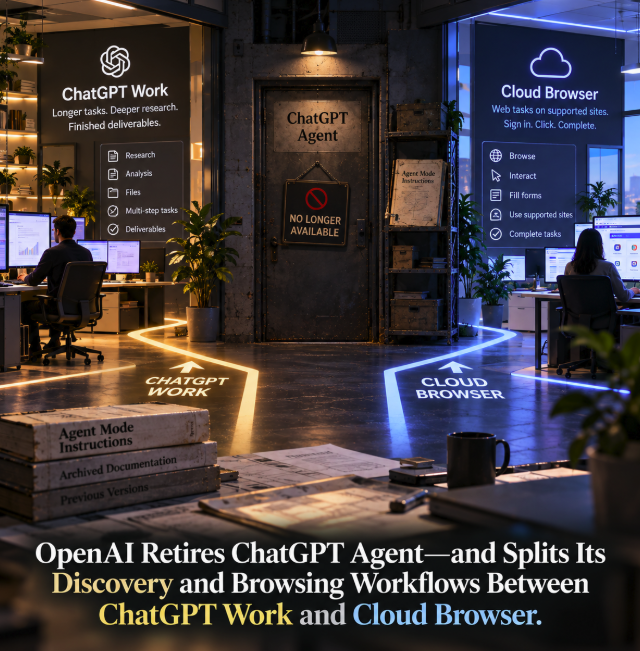
OpenAI has quietly retired ChatGPT Agent as a standalone product path and redirected its two most important jobs into a newer architecture. Longer, multi-step assignments now belong to ChatGPT Work, while supported website interaction is handled through Work's Cloud Browser.
The change is explicit in OpenAI's official ChatGPT Agent documentation, which now opens with a direct notice that ChatGPT Agent is no longer available. OpenAI tells users to use ChatGPT Work for longer, multi-step tasks and finished deliverables, and points browser workflows to its separate Cloud Browser documentation. The Help Center page was updated on September 15, 2026, according to the current page metadata.
This is more than a rename. Agent Mode originally bundled delegation, web navigation, connected data and computer-style interaction under one visible mode. OpenAI is now separating the user-facing concept of substantial delegated work from the browser infrastructure that may execute part of that work.
The retirement notice conflicts with the rest of the old Agent page
The most striking detail is that OpenAI's documentation has not been fully cleaned up. Immediately after stating that ChatGPT Agent is no longer available, the same page still contains legacy instructions telling users how to start Agent Mode, including selecting it from the tools menu or typing /agent. It also retains old plan availability, usage limits, scheduling instructions and Enterprise controls for Agent Mode.
That makes the page internally inconsistent if read as a current product guide. The retirement notice at the top is the operative update, while much of the material below appears to describe the previous Agent Mode experience. The mismatch is useful evidence of how recently the product transition occurred, but it also means older instructions should not be treated as proof that the retired mode remains available.
A separate OpenAI community support discussion has also been used to confirm the disappearance of Agent Mode for affected users. The strongest source, however, is OpenAI's own Help Center: the company now plainly says the product is no longer available.
ChatGPT Work inherits the long-running, multi-step job
OpenAI's replacement language is revealing. It does not tell users to move every Agent task to another feature with the same shape. Instead, it directs substantial assignments to ChatGPT Work — the environment designed for research, analysis, files, apps, multi-step execution and finished outputs.
That changes the product metaphor. “Agent” emphasized an autonomous actor. “Work” emphasizes the outcome: hand ChatGPT a meaningful piece of work and let the system decide which capabilities are needed to complete it.
For users, that can reduce the need to choose a special agent mode before describing the task. For OpenAI, it creates a broader orchestration layer in which browser interaction is one capability among several rather than the defining feature of the product.
Cloud Browser becomes the execution layer for supported websites
OpenAI's Cloud Browser documentation describes the other half of the transition. Cloud Browser gives ChatGPT Work a browser running on a separate computer in the cloud. It can read pages, click buttons, enter information into forms and perform steps on supported public and authenticated websites.
Users do not normally need to select Cloud Browser as a separate mode. OpenAI says they can start a task in Work and describe the desired result; ChatGPT decides whether to use a connected app or plugin, Cloud Browser, or a combination of those capabilities.
This distinction is strategically important. The browser is becoming infrastructure behind the task rather than necessarily the product the user explicitly invokes.
The new architecture separates intent from execution
Agent Mode put a recognizable label on a class of behavior: ChatGPT could browse, interact with sites and work through multiple steps. Work plus Cloud Browser separates that into two conceptual layers.
At the top is the user's objective. ChatGPT Work receives the task, gathers context, uses files or connected systems where appropriate, reasons across steps and produces the deliverable. Underneath it are execution mechanisms: plugins, connected apps, Cloud Browser and other supported tools.
That resembles a more mature agent architecture. The user specifies an outcome rather than micromanaging the toolchain, while the orchestration layer chooses the appropriate capability for each step.
Cloud Browser can continue after the user leaves
The browser component preserves an important part of the old agentic promise. OpenAI says a Cloud Browser task can continue remotely after the user leaves the conversation or turns off the local computer or phone. It pauses when it needs information, authentication or confirmation.
The browser has its own cloud-side state rather than inheriting the user's ordinary browser session. Users sign in separately when required, and Cloud Browser can retain its own cookies and authenticated sessions until they expire or are cleared.
That design makes it suitable for delegated web workflows without requiring a user's physical machine to remain online. It also creates a clearer separation between local browsing and the remote execution environment acting on the user's behalf.
Website operators now have a distinct ChatGPT Work traffic surface
The transition also matters outside ChatGPT. OpenAI has dedicated documentation for allowing ChatGPT Work's Cloud Browser through website security systems. The browser uses Web Bot Auth and HTTP Message Signatures under RFC 9421 to authenticate outbound requests.
According to OpenAI, Cloud Browser requests include Signature, Signature-Input and a Signature-Agent value pointing to ChatGPT. Website operators can verify the public signature and allowlist legitimate Cloud Browser traffic in CDNs or firewalls.
This creates an important distinction for publishers and web infrastructure teams. ChatGPT's interactive browser traffic is not simply another conventional crawler. It represents delegated user activity against supported websites, with its own authentication mechanism and access considerations.
Discovery, retrieval and browser action are becoming separate layers
For NetContentSEO, the most interesting consequence is how this architecture changes the path from a user request to a website. A ChatGPT task can potentially draw information from search or research systems, connected apps, plugins and direct browser interaction. Those are different access surfaces with different technical requirements.
A page being discoverable to search does not automatically mean an automated browser can interact with it. Conversely, a website may allow authenticated Cloud Browser traffic while applying separate rules to crawlers. OpenAI explicitly notes that some sites can block automated browser access even when they work normally in a user's personal browser.
This makes “visibility in ChatGPT” an increasingly incomplete technical category. Publishers need to ask which ChatGPT surface they mean: search discovery, a plugin or connected app, a crawler, or an interactive browser acting for a user.
OpenAI tells users to prefer connected apps or plugins when they fit the task
Cloud Browser is not intended to replace every structured integration. OpenAI's safety guidance explicitly recommends preferring a connected app or plugin when it directly supports the requested task.
That hierarchy makes sense. A structured integration can expose defined actions and data without requiring an AI system to visually navigate an arbitrary website. Browser automation remains valuable for workflows that lack a direct integration or require interaction with the site's interface.
As OpenAI simultaneously moves custom GPT workflows toward Plugins, the broader product direction becomes clearer: specialized integrations handle structured capabilities, Work orchestrates substantial tasks, and Cloud Browser fills the gap when execution requires a website.
Browser automation still has hard boundaries
OpenAI warns that Cloud Browser cannot complete every web task or transaction. Websites may block automated agents, authentication or transaction steps may be unsupported, and some actions can require the user to take control or complete the final step personally.
The company also continues to highlight prompt-injection and phishing risks. A browser-capable agent consumes untrusted web content while simultaneously possessing the ability to take actions, which creates a fundamentally different security problem from simply summarizing a page.
Users are therefore encouraged to verify sites, screenshots and confirmation prompts, provide precise instructions and avoid placing passwords, security codes or payment details directly into the conversation.
The retirement also clarifies the difference between cloud and desktop browsing
OpenAI now documents a separate built-in browser for the ChatGPT desktop app. That browser is visible to both the user and ChatGPT, can work across tabs and supports richer local browsing features. Cloud Browser, by contrast, runs remotely for delegated tasks initiated through Work.
The distinction reinforces the larger product split. Work is the task layer; different browser environments can support different kinds of execution depending on whether the job should continue remotely or remain closely tied to the user's desktop session.
Why retire the Agent label?
OpenAI has not published a detailed rationale for retiring ChatGPT Agent, so any explanation of its motives would be speculative. But the current product structure shows what replaces the old label.
Instead of asking users to understand when they need an “agent,” OpenAI can let them hand off a substantial task to Work. Work can then select a plugin, connected app, Cloud Browser or other capability as needed. The agency moves deeper into the orchestration layer while the user interface focuses on the job to be completed.
That is a subtle but meaningful product shift. Agentic behavior is not disappearing; it is becoming less dependent on a dedicated Agent Mode.
The stale documentation is itself worth watching
The remaining Agent Mode instructions on the retired page are a reminder that product documentation can lag fast-moving platform transitions. Anyone monitoring OpenAI for technical or SEO changes should prioritize the newest status notices and cross-check related documentation rather than assuming every section of a legacy article reflects the current interface.
In this case, the contradiction is unusually visible: “ChatGPT agent is no longer available” appears above instructions explaining how to start it. That should be read as transitional documentation, not as evidence that the retirement notice is ambiguous.
OpenAI is turning agentic behavior into infrastructure
The larger story is not that OpenAI has abandoned agents. ChatGPT Work is explicitly designed to carry substantial work through multiple steps, and Cloud Browser can still navigate supported websites and act on a user's behalf. Workspace agents also remain a separate concept for repeatable organizational workflows.
What has disappeared is the standalone ChatGPT Agent product path. The functions associated with it are being reorganized into a broader system where Work owns the task and specialized execution layers handle the actions.
OpenAI has retired ChatGPT Agent, but it has not retired agentic computing. It has split the old experience into a higher-level work environment and a browser execution layer. For publishers and technology teams, that makes the architecture more important than the old feature name: discovery, connected data and web interaction can now reach a site through different mechanisms, and each mechanism has its own visibility, access and security rules.