
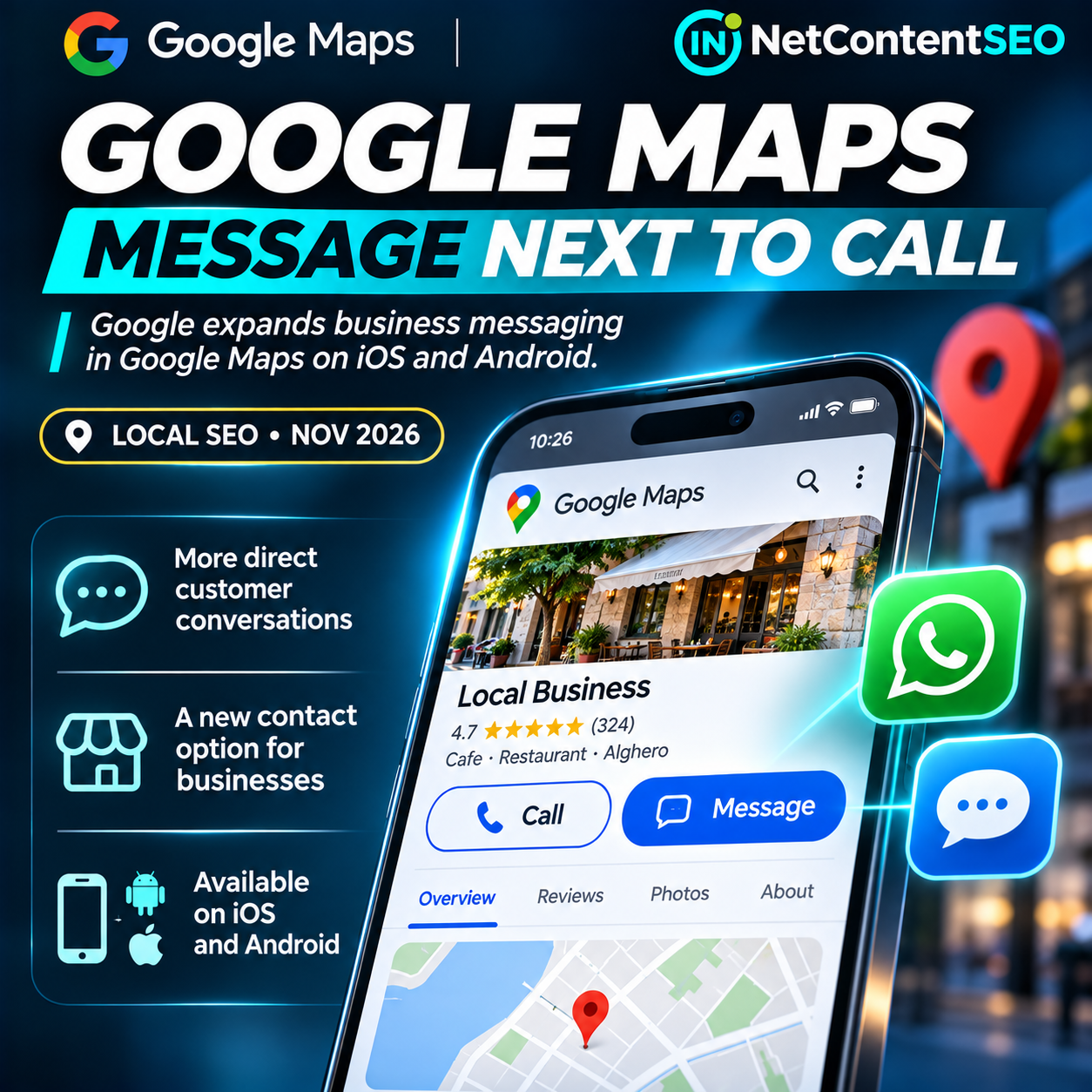
November 7, 2026. Google has moved business messaging into a more prominent position on Google Maps, placing a Message button beside Call on eligible business listings in the Android and iOS apps. The change was announced in Google's November Small Business Bulletin, posted by Google representative Lisa Landsman on November 5, and reported by Barry Schwartz on November 6.
For local SEO teams, the update is about reducing the distance between finding a business and contacting it. A customer looking at a restaurant, salon or service provider on Maps can now see messaging alongside the familiar call action. But this is not the launch of an entirely new chat product. Google previously introduced messaging from Maps; the November change makes the contact option easier to find across more locations within the listing interface.
What Google actually changed
According to the official bulletin, the Message action appears beside Call in the main Maps business listing and remains visible in the expanded header and bottom action bar. Previously, Google says, users often had to scroll farther down the profile to find the chat option. The new placement is intended to make contacting a business easier when a customer cannot or does not want to make a phone call.
Messages are routed to the business's configured contact channel, including WhatsApp or SMS/text. This distinction is important: the announcement does not establish that every eligible business has gained a new standalone Google inbox. Businesses must verify how their own messaging destination is configured and monitored.
Google's Business Profile help documentation says the feature requires a claimed and verified profile, and chat options are available only in selected regions. The November bulletin does not publish a country-by-country availability list. The change therefore should not be described as universally available in every market or on every listing.
Why this matters for Local SEO
Google Maps is a place where discovery and customer action happen close together. Someone searching for an available appointment, a last-minute reservation or a local repair service may prefer a short message over a phone call. Making Message as visible as Call creates another potential conversion path directly from the business profile.
That does not mean Google has introduced a new local ranking factor. The announcement concerns interface placement and contact accessibility, not a documented change to local ranking algorithms. No official evidence establishes that activating messaging improves a business's map-pack position. The immediate business value is operational: making it easier for customers to ask a question and receive a useful reply.
For service businesses, messaging may capture requests when staff are working with another customer. For retailers, it can help clarify stock or collection details. For hospitality businesses, it can support practical questions about hours, access or availability. These are plausible use cases, not measured conversion gains from Google's announcement.
How to enable or check WhatsApp and SMS messaging
Google's official setup procedure is straightforward, provided the option is available for the profile:
- Open the claimed and verified Google Business Profile with an owner or manager account.
- Select Edit profile, then Contact.
- Find Chat and select the edit control.
- Choose WhatsApp or Text message.
- Enter a valid WhatsApp click-to-chat URL or a phone number capable of receiving text messages.
- Save the configuration, then check the public listing in Google Maps on a supported mobile device.
- Send an authorized test message and verify that it reaches the correct destination and can be answered.
Google's help page adds an easily overlooked limitation: if both WhatsApp and text messaging are configured, customers are shown only the text-message option. Businesses should therefore test the channel users actually see, not assume that two configured destinations will both appear as choices.
If the Chat setting is absent, do not assume the account is misconfigured. The feature may be unavailable for the region or profile. Check Google's current eligibility guidance rather than creating unsupported workarounds.
A quick quality-control checklist for multi-location businesses
Businesses managing several branches should verify each profile separately. Check that the correct phone number or WhatsApp URL is associated with the location, that the recipient knows which branch the inquiry concerns, and that messages are routed to a monitored inbox. A generic national number may be convenient but can create confusion when a customer asks about a specific store's stock, opening hours or appointment availability.
Test the listing from both Android and iOS where practical. Record whether Message is visible beside Call, whether the action opens the intended channel, and whether the receiving team can reply. The presence of a button is not proof that a customer conversation can be completed successfully.
For businesses that operate outside regular office hours, define a realistic response process. If a message arrives while the location is closed, the team should know when it will be handled and how urgent requests are escalated. Do not promise instant responses unless staffing and tooling can deliver them.
How to measure the commercial impact
The announcement does not include adoption figures, click-through rates or evidence of higher sales. To determine whether the placement helps a particular business, establish a baseline and monitor outcomes over time.
Useful metrics include the number of inbound conversations, response time, qualified inquiries, appointments or orders attributable to messaging, and the proportion of conversations that result in a completed customer action. Google also directs businesses to review available chat performance metrics in Business Profile. The exact metrics and their availability can vary, so teams should confirm what their account actually reports.
For multi-location reporting, compare branches with similar operating patterns and account for seasonal demand, promotions, holidays and staffing changes. An increase in messages after the UI update does not by itself prove incremental revenue; some customers may simply switch from calls to texts. Measure the combined volume and quality of contacts rather than treating every new message as an additional lead.
Messaging, AI-assisted replies and the difference between them
Google has also been developing AI-enabled messaging for eligible Business Profiles, using RCS and an AI agent to answer routine questions and hand off conversations when needed. Barry Schwartz separately reported the expansion of that functionality in October 2026.
That is related to, but distinct from, the November Maps button-placement update. A prominent Message action does not prove that an AI agent is enabled for the business. Nor does configuring WhatsApp or SMS automatically mean the business has access to AI-powered customer service. Eligibility, channels and capabilities must be checked separately.
Where AI-enabled messaging is available, business information quality becomes important: accurate hours, service descriptions, booking options and policies help prevent misleading automated responses. Human handoff should remain available for questions the system cannot answer reliably. This is a practical intersection of local discovery and agentic customer service, not evidence of a new Google ranking signal.
Does this mean businesses can stop maintaining their websites?
No. A Google Maps contact button is a useful conversion touchpoint, but a website remains important for detailed service information, accessible policies, structured product or location data, and independent ownership of the customer experience. Some users will want to browse a menu, compare services or read full terms before initiating a conversation.
For local SEO, the more durable strategy is consistency across the business website, Google Business Profile and the messaging team. If Maps says a shop is open but the website shows a holiday closure, or if staff give a different price from the one published online, a faster contact channel can expose the inconsistency rather than solve it.
What the November announcement does not confirm
Google did not publish a complete geographic rollout list, adoption statistics, a new messaging-related ranking factor or a guarantee that every business category will see the button. The official help page explicitly notes regional and profile eligibility restrictions. The safest description is that Google has expanded the prominence of an existing business messaging capability on Maps for eligible profiles.
There is also no basis for claiming that the change directly increases visibility in AI Overviews or AI Mode. It concerns contact actions within Google Maps, although it fits the broader movement toward completing more of the local customer journey inside search and discovery interfaces.
Frequently asked questions
What changed in Google Maps business messaging in November 2026?
Google made the Message button more prominent, placing it beside Call on eligible business listings in the iOS and Android Maps apps.
When did Google announce the update?
Google's November Small Business Bulletin was posted on November 5, 2026. Search Engine Roundtable reported the change on November 6.
Is messaging new to Google Maps?
No. Google had already introduced messaging from Maps. The November update focuses on easier access to the existing contact action.
Which messaging channels are supported?
Google identifies WhatsApp and SMS/text messaging. The business must configure an eligible contact destination.
Can every business enable the Message button?
No. Google's documentation says chat is available in selected regions and may not be available for every profile.
How do I configure messaging?
Open Google Business Profile, choose Edit profile, then Contact and Chat, select WhatsApp or Text message, enter the destination and save.
What happens if both WhatsApp and SMS are configured?
Google says customers are shown only the text-message option.
Does messaging improve Google Maps rankings?
Google has not announced a messaging-related ranking change. The documented update concerns the user interface and customer contact.
Is the Message button the same as Google's AI-powered messaging agent?
No. AI-enabled messaging is a separate eligible feature; the new button placement does not establish that an AI agent is active.
What should agencies test first?
Confirm the button is visible on an eligible mobile listing, verify that the configured channel opens correctly, and check that incoming inquiries are received and answered.
Conclusion: local discovery is becoming a conversation
Google's November Maps update does not rewrite local search rankings, but it changes a highly practical part of the customer journey. The Message button is easier to find, potentially allowing a customer to move from discovering a business to asking a question without navigating through multiple screens.
For Local SEO teams, the next step is simple: verify eligibility, test the messaging destination and measure whether conversations turn into useful customer outcomes. A visible contact button only creates value when someone is ready to respond.
Sources
- Google Business Profile Community — November 2026 Small Business Bulletin (official announcement).
- Google Business Profile Help — Chat with customers from your Business Profile (official configuration and eligibility).
- Search Engine Roundtable — Google Expands Business Messaging to Google Maps on iOS & Android, November 6, 2026.
- Google Business Profile Help — AI-enabled messaging (separate capability).