

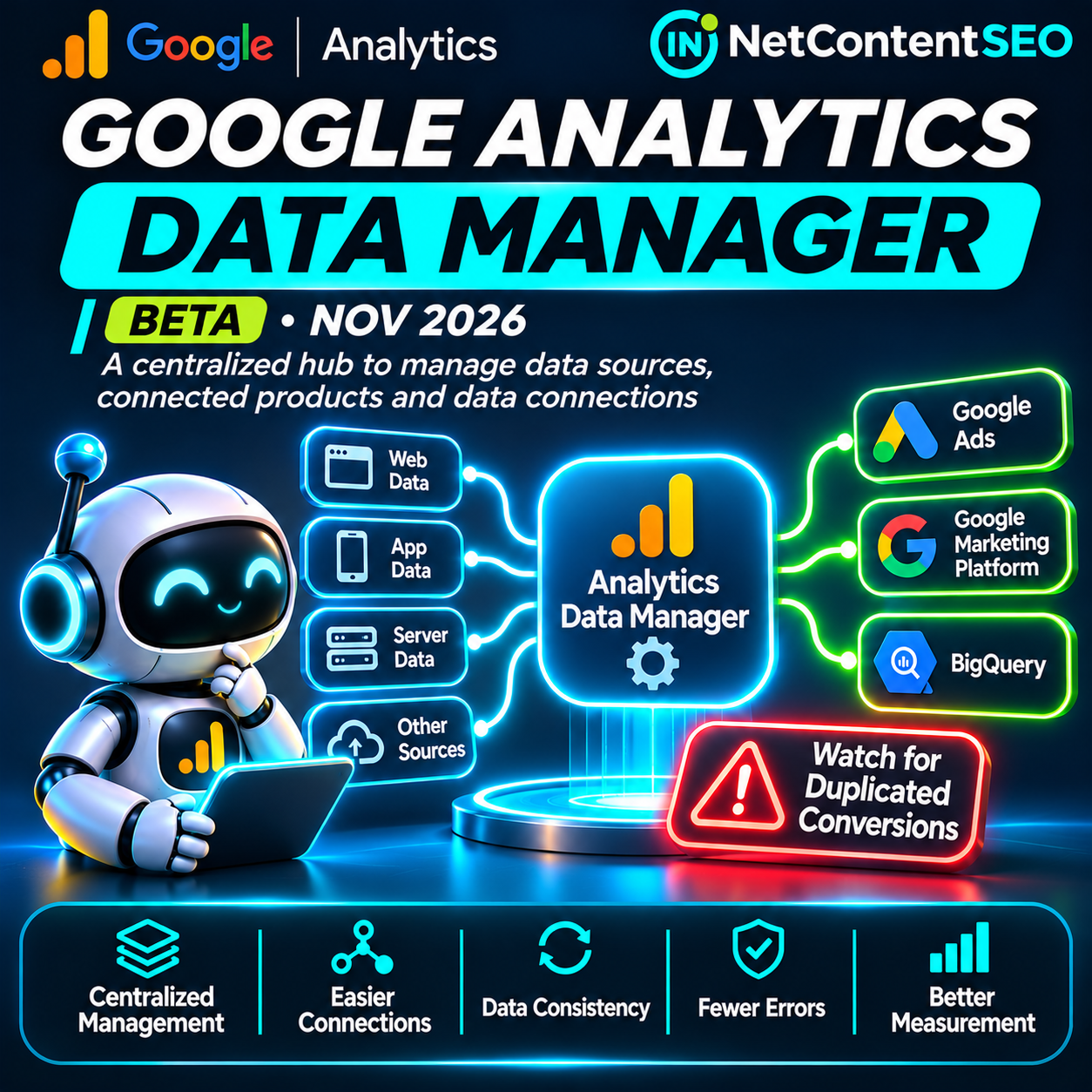

Google has officially introduced Data Manager in Google Analytics as a beta, giving administrators a centralized place to manage data streams, product links and first-party data connections. The release is dated November 6, 2026 in Google's Analytics release notes, while Barry Schwartz highlighted it on November 9 in Search Engine Roundtable. For marketers, the important change is operational: connections and diagnostics that previously required navigating several areas can now be inspected through a single interface.
There is also a warning worth paying attention to. Google says setting up an identical data pipeline in both Analytics and Google Ads or Google Marketing Platform can cause conversions to be recorded twice. A more convenient setup experience is not a reason to duplicate existing integrations.
What is Google Analytics Data Manager?
According to Google's official Data Manager beta documentation, Data Manager is a centralized data management interface for Google Analytics properties. It brings together data streams, connected products and first-party data imports, along with tools for visualizing data flow and troubleshooting connection problems.
Google lists centralized management, simplified data ingestion, a visual data connection map and proactive data-strength guidance among the benefits. The tool is designed to help teams understand which sources send information into an Analytics property and which linked products receive data from it.
This is not a new analytics property type, a replacement for all existing measurement products or a new AI search ranking feature. It is an administration and connection-management interface within Google Analytics.
When was Data Manager released?
Google's What's new in Google Analytics page records the launch under November 6, 2026 and labels it beta. Barry Schwartz reported the release on November 9, noting that he did not yet see the new tab in his own Analytics account.
The distinction matters. An official beta announcement confirms the product feature exists, but it does not establish that the interface is immediately visible in every account. Availability should be checked within the specific Analytics property.
Where to find Data Manager in GA4
Google documents the following access path:
- Open the relevant Google Analytics property.
- Navigate to Admin.
- Look for Data Manager in the left navigation, below My preferences.
- Review the connection map and the lists of data streams and connected products.
Appropriate property permissions are required. Google also says that subproperties and roll-up properties do not currently support the Data Manager landing page. If the tab is missing, check the property type, permissions and beta availability rather than assuming the existing connections are broken.
The data connection map: what it shows
One of the most useful features is the data connection map. Google places the Analytics property in the middle of the diagram, incoming sources to the left and data destinations to the right. This lets administrators trace how data enters the property and where it is exported.
The map offers three levels of detail. A compact mini map provides an overview. An expanded view exposes individual connections and organizes them into four areas: data sources, data types, property and streams, and data export. A full-page view provides more room to inspect complicated setups.
Examples of incoming sources can include a Google tag or SDK, Google Tag Manager, a customer relationship management system, a linked Google Ads product or an offline file. The diagram can help teams distinguish data collection from subsequent activation or export.
Administrators can hover over connections, inspect node details, highlight paths and filter the map. Google says sources with detected problems can display a broken state or a red indicator; the details panel may offer a Fix action for the identified issue.
Managing streams and connected products
Below the connection map, Data Manager provides separate sections for Data streams and Connected products. The streams area includes web and app streams, with an option to add a stream. The connected-products area includes product links and data import connections.
To create a supported connection, Google instructs users to choose Connect Product, select the data source, specify how it will be used and begin setup. Existing connections can also be inspected or deleted through the management interface.
Before deleting or recreating a connection, document the current data flow and confirm which teams or products depend on it. A connection that looks redundant in the new interface may still support an active reporting or advertising workflow.
The critical warning: duplicate conversions
Google's documentation contains a specific warning about duplicating data pipelines. New connections should be initiated from the Analytics property when appropriate. Existing connections configured in Google Ads or Google Marketing Platform should generally continue to be managed there rather than recreated in Analytics.
Data ingested through Data Manager in Google Analytics can flow downstream to linked Google Ads and Google Marketing Platform accounts, but not in the reverse direction. If a business activates the same pipeline in both interfaces, Google warns that conversions can be logged twice.
For example, a company importing offline sales should not automatically configure an identical import again in Analytics simply because the new hub makes it easier to do so. First identify the existing connection, determine the authoritative source and verify how conversion events are being sent and counted.
This is not a theoretical SEO concern. Inflated conversion numbers can distort campaign reporting and bidding decisions, even when organic search traffic itself is unchanged.
What happens to existing data imports?
Google says existing data imports in Google Analytics will appear automatically in Data Manager. It recommends using the Analytics Data Manager interface for future connections, while avoiding duplication of connections already managed elsewhere.
Some data types, including item data and third-party campaign data, must be established directly through Data Manager in Google Analytics. The correct setup therefore depends on both the data type and where an existing integration is configured.
Why this matters for SEO teams
Data Manager does not change Google's search ranking systems. It does not directly increase organic visibility, alter indexing or improve AI citations. Its value for SEO is the quality and maintainability of measurement infrastructure.
SEO teams frequently combine Analytics data with Search Console, advertising reports, CRM records and other business data. If connections fail or imported events are duplicated, performance conclusions can become unreliable. A centralized view of the data flow can make it easier to identify missing or misconfigured connections before an apparent traffic or conversion change is attributed to a Google algorithm update.
However, a healthy connection indicator does not prove that every underlying event is accurate. Teams must still validate event definitions, attribution settings, consent implementation, source classification and business outcomes.
Does Data Manager improve AI Search or GEO measurement?
Not directly. Data Manager manages data connections; it does not provide a complete report of which brands are mentioned or cited in ChatGPT, Google AI Mode, Perplexity or other assistants.
There is useful context elsewhere in Google Analytics. Google's May 13, 2026 release notes describe an AI Assistant channel for traffic from recognized assistants, and the June 11 update describes source grouping that includes emerging sources such as ChatGPT and Perplexity. Those are separate Analytics measurement developments, not capabilities newly introduced by Data Manager in November.
For GEO teams, the practical connection is that a more reliable data setup can support analysis of attributable AI referrals and downstream conversions. It cannot reveal every answer impression, unclicked brand mention or citation within an AI-generated response. Those require separate measurement methods, and the limitations should be disclosed.
How agencies should audit Data Manager
- Inventory the current setup. List web and app streams, linked products, imports and CRM or offline conversion feeds before making changes.
- Check access and availability. Confirm the correct Analytics property, permissions and beta availability.
- Inspect the map. Follow each incoming data source through the property to its destinations and identify unexplained gaps.
- Investigate alerts. Open red or broken nodes and review the issue before using a suggested Fix action.
- Prevent duplicate pipelines. Determine whether a connection already exists in Google Ads or GMP before recreating it in Analytics.
- Validate event counts. Compare key conversions against CRM or transaction records to identify double-counting or missing data.
- Check AI referrals separately. Review the available AI Assistant channel and source dimensions, recognizing that they measure identifiable visits rather than all AI answer visibility.
- Document ownership. Record which team manages each connection and how future changes will be tested.
What Data Manager does not solve
The new interface is not a substitute for analytics governance. It does not automatically correct incorrectly configured events, guarantee attribution accuracy, make every third-party data source available or resolve consent and privacy obligations.
Nor does the visual map prove that all expected conversions were collected. A connected product can still send incomplete or improperly defined events. The appropriate validation is to compare the resulting data with independent business records and the actual implementation.
Because the feature is in beta, teams should also avoid assuming that every property type and account receives identical capabilities or that the interface will remain unchanged.
Frequently asked questions
Is Google Analytics Data Manager officially released?
Yes. Google announced Data Manager in Google Analytics as a beta on November 6, 2026. Barry Schwartz reported it on November 9.
Where is Data Manager in Google Analytics?
Open the relevant property, select Admin and look for Data Manager beneath My preferences in the left navigation.
Why can't I see Data Manager?
Availability may vary during beta. Check permissions and property type. Google says subproperties and roll-up properties do not currently support the landing page.
What is the data connection map?
It is a visual representation of incoming data sources, data types, the Analytics property and streams, and outgoing destinations, with tools for inspecting and troubleshooting connections.
Can Data Manager cause duplicate conversions?
Yes, if the same data pipeline is activated in both Analytics and Google Ads or GMP. Google explicitly warns against that configuration.
Does data flow from Google Ads back into Analytics through this setup?
Google documents the relevant Data Manager ingestion flow as downstream from Analytics to linked Ads or GMP products, not the reverse. Existing product integrations may have their own reporting behavior and should be reviewed separately.
Will my existing Analytics imports disappear?
Google says existing Analytics data imports automatically appear in Data Manager. Administrators should inspect rather than recreate them.
Does Data Manager change Google rankings?
No. This is a data administration feature, not a Search ranking update.
Can Data Manager measure ChatGPT citations?
No. Google Analytics can report certain identifiable AI assistant referrals through separate features, but Data Manager does not provide complete citation or brand-mention analytics.
The bottom line
Google Analytics Data Manager is a meaningful operational improvement for teams managing complex measurement setups. Its centralized connection map, diagnostics and import controls can make data flows easier to understand and maintain.
The immediate priority is not to migrate everything. It is to audit existing connections, fix real issues and avoid duplicate conversion pipelines. For SEO and GEO, reliable measurement is essential, but this beta should be understood as infrastructure for trustworthy analytics rather than a new source of ranking or AI citation visibility.
Sources
- Google Analytics Help — What's new in Google Analytics, November 6, 2026.
- Google Analytics Help — About Data Manager in Google Analytics (beta).
- Search Engine Roundtable — New Data Manager In Google Analytics Beta, November 9, 2026.
- PPC Land — Google Analytics Data Manager: duplicate Ads setups can log conversions twice, November 8, 2026.