

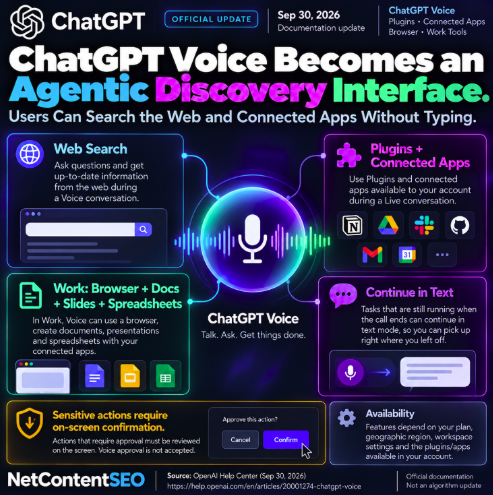

ChatGPT Voice is becoming more than a conversational interface. OpenAI's current documentation says Live can use plugins and connected apps available to the user's account, while Voice inside ChatGPT Work can coordinate broader tasks including browser use and document creation.
For AI discovery, the important shift is that users can increasingly move from asking a spoken question to retrieving information from the web or connected services without switching back to a typed workflow.
Live can use plugins and connected apps
During a Live conversation, users can ask ChatGPT to use a plugin available to their account. Connected apps can provide access to supported external information and actions, subject to the same account authorization, workspace permissions and action restrictions that apply outside Voice.
This means Voice can act as an entry point into workflows that previously required users to manually open an integration or type a request.
Voice can search the web
OpenAI's Voice documentation also states that Live can use web search, allowing users to ask spoken questions that require current information.
From a search perspective, this creates another interface through which users can formulate information needs without a conventional search box.
Voice in Work can use a browser and create files
The capabilities expand further inside ChatGPT Work. On web and mobile, users with the required access can use Live to work with connected apps, use a browser, and create documents, presentations and spreadsheets.
OpenAI's cloud browser can navigate supported websites, read pages, click controls and carry out multi-step web tasks when Work determines browser interaction is appropriate.
Tasks can continue after the voice call ends
Voice does not require every task to finish during the spoken session. OpenAI says that if a Work task is still running when the call ends, it can continue in the text conversation.
This effectively lets Voice initiate or coordinate longer-running work while text becomes the persistent interface for progress and results.
Sensitive actions still require screen confirmation
Voice access does not remove approval safeguards. When an action requires user approval on web or mobile, OpenAI says the user must review and approve or reject it using the on-screen controls. Voice approval alone is not accepted.
Existing plugin and connected-app permissions also remain in force. Voice does not expand the underlying data access granted to an app.
Availability depends on the account and workspace
The exact capabilities available to a user depend on plan, region, workspace configuration and which plugins or connected apps are installed and authorized. Voice in Work additionally requires access to both Voice and Work.
The NetContentSEO view
This update matters for AI visibility because Voice is becoming an agentic discovery interface rather than merely an alternative input method.
A spoken request can trigger web search, retrieval from connected services or a longer Work task. That potentially changes how discovery begins: the user may never type a keyword, visit a conventional results page or manually choose the application containing the information.
For publishers and brands, this reinforces a broader GEO trend. Visibility increasingly depends on whether content can be discovered, retrieved and used by AI systems across multiple interfaces — text chat, voice, connected apps and agentic browser workflows.
OpenAI has not announced a separate Voice-specific ranking or citation system, so this should not be interpreted as a new search algorithm. The significance is the interface and workflow change: more retrieval journeys can now begin with speech.