

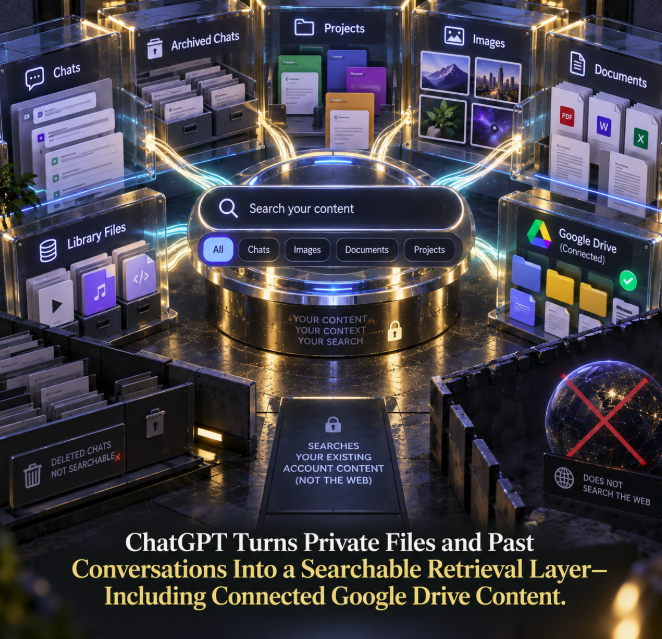
ChatGPT’s sidebar search is becoming a retrieval layer across a user’s own information rather than merely a way to reopen old conversations. OpenAI now documents a unified search experience that can return chats, archived conversations, projects, images, documents and other eligible Library files, with connected Google Drive folders and files also appearing where the integration is available.
The scope is described in OpenAI’s newly updated Finding your chats, projects, and files in ChatGPT documentation. The key boundary is explicit: sidebar search looks through existing content in the user’s ChatGPT account or current workspace. It does not search the web.
That distinction makes the feature more interesting than a cosmetic search-box upgrade. ChatGPT increasingly has two different retrieval environments: one for finding public online information and another for finding material the user already has access to across conversations, projects, generated or uploaded files and connected storage.
One search can now span several kinds of personal content
OpenAI says users can open Search from the ChatGPT sidebar, enter words or phrases related to what they are looking for and select a result to reopen the corresponding chat, project, image, document or folder. On the web, the search interface can also be opened with Ctrl+K on Windows or Cmd+K on macOS.
Available filters can include All, Chats, Images, Documents and Projects. OpenAI notes that the exact result types, connected sources and filters can vary depending on account, workspace and device, so the experience should not be assumed to be identical for every user.
The broader design is nevertheless clear: a single retrieval surface can cross content formats that previously lived in different parts of the product.
Archived conversations remain part of the searchable layer
The search system does not stop at conversations visible in the current sidebar. OpenAI says regular and archived chats can both appear in results, and search can match words in a conversation’s title or messages.
This is useful because an older conversation disappearing from the visible sidebar does not necessarily mean it has been deleted. A user can search for a remembered phrase and reopen the conversation even when it is no longer immediately visible in recent history.
Archived chats remain searchable despite being absent from the regular chat-history view. Deleted chats are different: OpenAI says deleting a conversation removes it from the account view and sidebar search, and deleted chats cannot be recovered through search.
Projects, images and documents now participate in the same discovery surface
The search interface can also surface projects, images, documents and other eligible files saved in Library. That moves retrieval beyond conversational history and toward the broader body of work accumulated inside ChatGPT.
A project may contain a long-running workstream. An image may have been generated weeks earlier. A document may have been uploaded for analysis and then reused in another task. Unified search makes those objects discoverable from the same sidebar entry point instead of requiring the user to remember where each type of content was stored.
OpenAI’s Library documentation describes Library as the place for finding, reusing, downloading, deleting and managing saved or connected files. Sidebar search complements that system: search helps locate eligible files, while Library remains the management interface.
Connected Google Drive can extend the retrieval layer outside ChatGPT storage
The most consequential extension is Google Drive. OpenAI says that when an eligible Google Drive account is connected, folders and files the user can access may appear in sidebar search results alongside native ChatGPT content.
Those files are not converted into ordinary ChatGPT uploads simply because they are discoverable. OpenAI’s Library documentation says connected Google Drive files remain associated with their original service.
That creates a retrieval layer spanning two information environments: material created or saved in ChatGPT and eligible material that remains in Google Drive. The exact availability depends on account, plan, workspace configuration, permissions and connected sources.
Google Drive availability has its own plan and permission requirements
OpenAI currently says Google Drive in Library supports Plus, Pro, Business, Enterprise, Edu and Healthcare accounts on the web, across both Chat and Work toggles. Workspace administrators may also control whether the required integration capabilities are available.
The initial Drive experience includes files and folders in My Drive and items shared directly with the user. OpenAI says Shared Drives are not currently included in that Library experience.
These qualifications matter because the unified search documentation is deliberately conditional: connected Google Drive results appear when available. The feature should not be described as automatically indexing every user’s entire Drive account.
This is account search, not web search
OpenAI explicitly warns users not to confuse sidebar search with ChatGPT’s web-search capability. Sidebar search finds existing content in the user’s account or current workspace. For current information and public online sources, users need ChatGPT’s separate web-search functionality.
That creates an important retrieval boundary. Searching for a company name in the sidebar may return a previous conversation, project, image or connected document associated with that term. It does not mean ChatGPT is simultaneously searching public websites for the company.
From an information-architecture perspective, ChatGPT is separating private/account retrieval from public-web retrieval, even though both can ultimately provide context for AI-assisted work.
The feature has been expanding in stages rather than appearing all at once on September 20
The September documentation update consolidates and clarifies functionality that OpenAI has been rolling out in stages. According to the company’s ChatGPT release notes, unified search across chats, projects, images and documents was announced globally on July 14, 2026 for web, iOS and Android.
On August 13, OpenAI separately announced Google Drive inside Library, allowing eligible users to browse Drive files and folders, pull a Drive file into a conversation and work with supported Google documents without uploading a duplicate.
The newly updated help page now describes these pieces together as one broader search model. That chronology is important: September 20 should be treated as a documentation clarification and expansion of the documented retrieval scope, not as the original launch date of every underlying component.
Searchability changes the value of old conversations
Conversation history is much more useful when it can be retrieved by content rather than only by chronology. A user may remember an idea, decision, draft or research finding without remembering when the conversation occurred or what its title was.
OpenAI says sidebar search can match words inside chat messages as well as titles. That turns past conversations into a searchable corpus of prior work rather than a simple reverse-chronological archive.
This does not mean ChatGPT automatically uses every matching past conversation as context in every new answer. Search and model context are different concepts. The documented feature helps the user locate and reopen existing material; it should not be interpreted as a claim that the entire account history is silently inserted into every conversation.
Files become reusable objects rather than one-chat attachments
Library strengthens the same pattern for documents and generated assets. OpenAI says uploaded and generated files can be saved in Library and then added to other conversations later. Supported file types include documents, spreadsheets, presentations, PDFs and images.
That changes the lifecycle of a file inside ChatGPT. Instead of existing only as an attachment to the conversation where it first appeared, an eligible saved file can become a reusable object that is searchable and available for future work.
There are exceptions. Files uploaded in Temporary Chat are not saved to Library while the chat remains temporary, and OpenAI says files uploaded in ChatGPT Health are not saved to Library. The searchable corpus therefore follows product-specific storage and privacy rules rather than indiscriminately collecting every file shown to ChatGPT.
Permissions remain part of retrieval
OpenAI says search results depend on the user’s account, current workspace, connected sources and permissions. That qualification becomes especially important when connected cloud storage is involved.
A unified search interface can make several repositories feel like one corpus, but the underlying access controls still matter. A user cannot assume that connecting a service makes every file in an organization searchable, and workspace policies can limit available sources or capabilities.
For organizations, this makes retrieval governance part of the AI workspace architecture. The convenience of one search box sits on top of account boundaries, source permissions and administrator controls.
Private retrieval is becoming a core ChatGPT capability
The strategic shift is that ChatGPT is increasingly able to operate over information the user already owns or can access. Web search answers the question, “What can ChatGPT find online?” Unified sidebar search addresses a different question: “Where is the thing I already worked on or have access to?”
That second question becomes increasingly important as ChatGPT accumulates projects, generated images, uploaded research, spreadsheets, presentations and connected cloud files. Without retrieval, that growing corpus risks becoming another archive users struggle to navigate.
Search turns it into a more usable knowledge layer.
Connected storage blurs the boundary between AI workspace and file system
Google Drive integration makes the direction particularly visible. A file can remain in Drive, appear in ChatGPT’s Library and search surfaces, and then be brought into a conversation when the user wants the model to summarize, analyze, compare or work with it.
The AI workspace therefore does not need to become the permanent storage location for every document. Instead, it can increasingly function as a retrieval and interaction layer over connected repositories.
This model is likely to matter more as users connect multiple work systems. The value of an AI assistant is not only generating new material; it is also locating the right existing material at the moment it becomes useful.
ChatGPT is building a private search layer beside its public one
OpenAI’s updated documentation makes the product architecture easier to see. ChatGPT now has a sidebar search that can span conversations, archived chats, projects, images, documents and eligible Library files, with connected Google Drive folders and files joining the results where supported.
The company is equally explicit about what that search is not: it is not a web search, it does not recover deleted conversations and its available sources depend on account, workspace, device and permissions.
The result is a private retrieval layer built around the user’s own working corpus. As ChatGPT becomes a place where people create, upload, organize and connect more information, finding that information may become as important as generating it in the first place.