

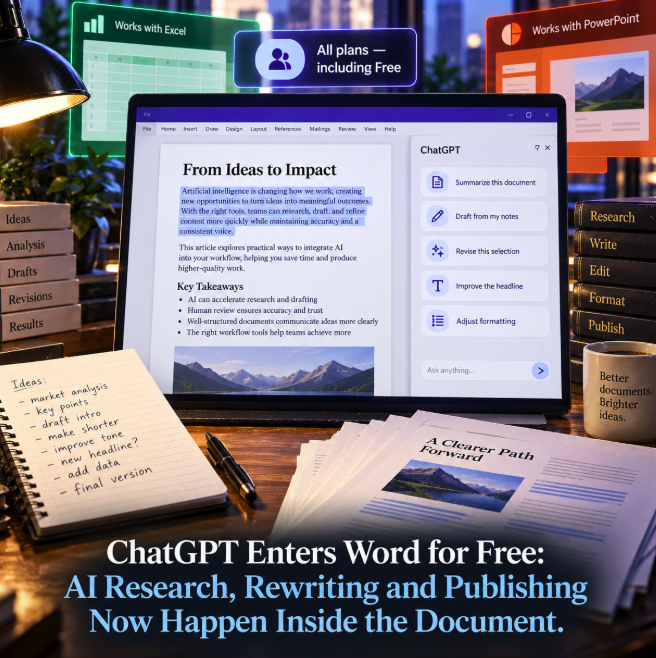
ChatGPT has moved directly into Microsoft Word, turning one of the world's most familiar document editors into another native surface for OpenAI's assistant. According to OpenAI's official September 17 release notes, ChatGPT for Word is available on every ChatGPT plan, including Free, and works from a sidebar inside the document rather than requiring users to move text back and forth between Word and a separate ChatGPT conversation.
The integration covers much of the work that happens between a blank page and a finished document. Users can turn notes and source material into a first draft, summarize an existing file, revise selected passages for a different audience, reorganize sections and adjust headings, numbering and formatting. Word now joins Excel and PowerPoint through the same Microsoft add-in, extending ChatGPT's productivity strategy from analysis and presentations into the core writing environment.
ChatGPT can work on the document that is already open
OpenAI's dedicated ChatGPT for Word documentation describes the product as a sidebar that operates alongside the active Word document. Users can ask questions about that document, select a specific passage and request a revision, or provide notes and reference text that ChatGPT can turn into a memo, proposal, report or other first draft.
That changes the ergonomics of AI-assisted writing. The common workflow of copying a paragraph into ChatGPT, asking for an edit, copying the answer back into Word and repairing the surrounding formatting is replaced by an interaction that starts from the document itself. The user can keep the source, draft and editing context in the same application while directing the assistant toward the section that needs work.
OpenAI also lists terminology checking as a supported workflow. ChatGPT can inspect a draft for unclear language or inconsistent terms, making the integration relevant not only to generative writing but to editorial cleanup and document quality control.
Free users are included, but plan limits still apply
The rollout is unusually broad: OpenAI says ChatGPT for Word is available across all ChatGPT plans, explicitly including Free. That does not mean unlimited Word usage. The company's release notes say each account remains subject to its plan's token limits, and Word can draw from shared usage allowances that also cover Codex and other premium capabilities on plans where those allowances apply.
The distinction matters because “available on Free” describes product access rather than an unlimited entitlement. A Free user can install the add-in and use ChatGPT inside Word, but the amount and complexity of work that can be completed will still depend on the limits attached to the account.
For managed organizations, availability also depends on administration. OpenAI says ChatGPT workspace administrators can enable or disable Word access, while Microsoft 365 administrators must permit the ChatGPT add-in before employees can use it. OpenAI's Word documentation says the feature is scheduled to be enabled by default starting October 1, 2026, subject to those administrative controls.
The writing workflow now runs from notes to formatting inside Word
The feature set maps closely to the stages of professional document production. A user can begin with fragmented research notes, ask ChatGPT to organize them into a draft, request an executive summary, select a section for a shorter or more technical rewrite and then adjust the document's headings and formatting without leaving Word.
OpenAI recommends selecting the exact text that needs a targeted change and telling ChatGPT what should remain unchanged. For larger revisions, the company suggests asking the assistant to propose a structure or explain the intended edits before modifying the document. Those recommendations are significant because document-level AI can otherwise make broader changes than a user intended, particularly in long files where defined terms, numerical claims and carefully approved wording need to remain stable.
The product therefore does not remove the need for editorial review. It moves AI generation and editing closer to the final artifact, which makes review more convenient but also makes it easier for generated changes to enter a document that looks publication-ready.
Word completes a Microsoft Office content workflow
OpenAI's release notes position Word alongside the existing Excel and PowerPoint integrations. ChatGPT for Excel can create, update and explain spreadsheets, including complex workbooks with formulas and multiple sheets, while ChatGPT for PowerPoint brings AI-assisted presentation work into the slide editor. Word adds the long-form text layer to that set.
For knowledge workers, the three applications cover a large portion of the traditional office-content pipeline. Data can be analyzed in a spreadsheet, findings turned into written material in Word and the same ideas shaped into a presentation in PowerPoint. The integrations do not automatically make those stages one continuous autonomous workflow, but they reduce the number of times users have to leave the application containing the artifact they are editing.
This is a different product direction from asking users to bring every file into a standalone chatbot. ChatGPT is increasingly being placed inside the software where the work already lives.
For publishers, the final editing surface now contains the AI
The Word integration is particularly relevant to editorial and content teams because Microsoft Word often sits close to the end of the production chain. Research notes, interview transcripts, briefs and rough drafts may originate elsewhere, but the document that goes through editing, approval and client review frequently lives in Word.
Putting ChatGPT in that environment means AI assistance can remain present during the stages where wording becomes final. A writer can request alternative structure, an editor can tighten selected passages, a communications team can adapt the same section for a different audience and a reviewer can ask the assistant to identify inconsistent terminology without creating separate temporary copies in another interface.
The potential efficiency is obvious, but so is the editorial risk. A polished rewrite can still introduce a factual error, remove an important qualification or subtly change the meaning of a source. OpenAI's own guidance emphasizes specifying what should remain unchanged. For publishing workflows, important claims, quotations, dates, statistics and legal wording still need human verification after AI-assisted edits.
“Research inside Word” needs a careful definition
The broader strategic appeal is that research, drafting and revision can increasingly happen without breaking the document workflow. But the Word integration should not be interpreted as evidence that every generated statement has been independently sourced or verified simply because ChatGPT is operating beside the document.
When users supply source material, ChatGPT can work from that context. When the task involves external factual research, the quality of the final document still depends on the sources available to the assistant and on whether the claims are checked. The integration improves the interface between research and writing; it does not eliminate the distinction between generating prose and validating evidence.
That distinction is especially important for SEO, journalism and corporate publishing, where an apparently small rewrite can alter attribution, certainty or factual scope. Keeping the assistant in Word makes iterative editing faster, but it also increases the value of explicit editorial rules around what AI may change automatically.
The competitive shift is from AI destination to AI layer
ChatGPT originally trained users to visit a dedicated conversational interface and bring tasks to it. Office integrations invert that relationship. Instead of making the document travel to the AI, the AI appears beside the document, spreadsheet or presentation.
That distribution strategy matters because switching costs in knowledge work are often measured in attention rather than software fees. Copying text between applications, rebuilding formatting and repeatedly explaining context create friction. An embedded assistant can see the working artifact and respond to a selected section, reducing that friction even when the underlying model is unchanged.
Making Word access available on the Free plan widens the potential adoption funnel further. AI-assisted editing inside a mainstream document application is no longer positioned only as an enterprise or premium workflow; OpenAI is exposing the interaction model to consumer users as well, within their normal plan limits.
The document is becoming the AI workspace
The most consequential part of ChatGPT for Word is not any single summarization or rewriting command. Similar tasks have been possible by uploading or pasting Word content into AI assistants for years. The change is where the interaction happens.
When AI sits inside the editable document, the distance between generation and publication becomes much shorter. Notes can become paragraphs, paragraphs can be rewritten, headings can be reorganized and formatting can be adjusted in the same environment where the human reviewer sees the final artifact. That can accelerate production, but it also makes provenance and review practices more important because AI-generated changes can move into finished documents with fewer visible handoffs.
ChatGPT for Word turns AI from a separate writing destination into part of the document interface itself. With access extending to Free users and Word joining Excel and PowerPoint, OpenAI is pushing toward a productivity model in which the assistant follows the user across the files where research, analysis, writing and presentation already happen. The next competitive question is no longer simply which chatbot writes better text, but which AI can become the most useful layer inside the applications people already use to produce their work.