

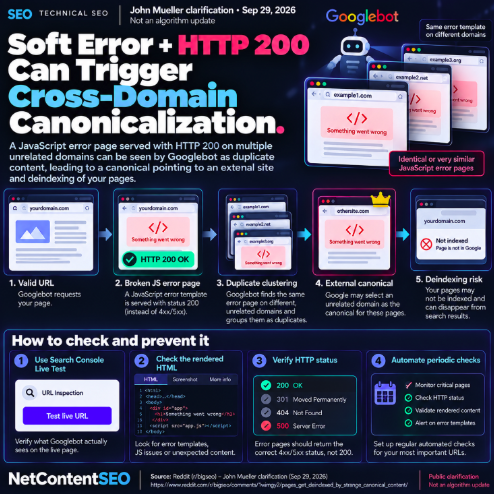

A broken JavaScript error template can create a surprisingly severe indexing failure when the server still returns HTTP 200. In a September 29 discussion about pages disappearing from Google, John Mueller explained that if Googlebot renders the same error page across unrelated websites, those URLs can look like duplicates and be clustered together.
In that situation, Google may select a URL on an entirely different domain as the canonical version of the duplicated content — leaving the affected site's real pages out of the index.
The URL returns 200, but Googlebot sees an error page
The problem begins when a requested URL technically succeeds at the HTTP layer while the rendered page does not contain its intended content.
A JavaScript failure, shared application error or broken rendering path can instead produce a generic error template such as “Something went wrong.” If the response still carries a 200 OK status, crawlers are being told that this is a valid indexable document rather than an error response.
The same error template can appear on unrelated domains
The situation becomes more dangerous when the same application, JavaScript bundle, hosting layer or template produces an identical or near-identical error page across multiple websites.
Googlebot can then encounter substantially the same rendered content on URLs belonging to different domains. From a duplicate-detection perspective, those pages may no longer resemble their intended articles, products or landing pages — they resemble one another.
Google can cluster the pages and choose an external canonical
Mueller's explanation highlights the consequence: if Google recognizes these rendered error pages as duplicates, it may group them into a canonical cluster.
Canonicalization is not restricted to URLs within one domain. When Google believes pages across domains contain duplicate content, it can select one URL as representative of the cluster. In an abnormal error-template scenario, that can produce the bizarre result of an unrelated external domain being reported as the Google-selected canonical.
Why pages can disappear from the index
Once the affected URL is treated as a duplicate of the selected canonical, Google may stop showing that URL independently in search results.
The apparent deindexing can therefore look like a canonicalization bug when the underlying cause is actually what Googlebot received and rendered when it crawled the page.
Search Console Live Test is the first diagnostic step
Mueller recommended checking affected URLs with Search Console's live testing tools. The important question is not only what the page shows in a normal browser session, but what Googlebot can retrieve and render at that moment.
Inspect the rendered HTML and screenshot for error templates, missing application content, failed resources or unexpected fallback states.
HTTP status codes must match the real state of the page
If a page cannot serve its intended content because of a genuine server or application failure, returning 200 OK can create misleading indexing signals.
Sites should ensure error conditions return an appropriate HTTP status where applicable and should avoid exposing generic failure templates as successful indexable documents.
Automated monitoring can catch the failure before Google does
Mueller also suggested periodic automated checks of important pages. A monitoring system can verify not only that a URL returns 200, but that expected page elements and content are actually present.
This distinction matters for JavaScript-heavy sites: a simple uptime monitor may report success while users and crawlers are receiving a broken application state.
The NetContentSEO view
This case is a useful reminder that canonicalization follows the content Google actually processes, not the content a site intended to serve.
When many valid URLs suddenly show an inexplicable external canonical, the investigation should go beyond canonical tags. Check rendered content, JavaScript failures, shared error templates, CDN behavior and server status codes.
This was a public troubleshooting clarification from Mueller, not an announced Google algorithm update. But the mechanism is highly actionable: a generic HTTP-200 error page can accidentally turn unrelated URLs into apparent duplicates and create cross-domain canonicalization problems.