

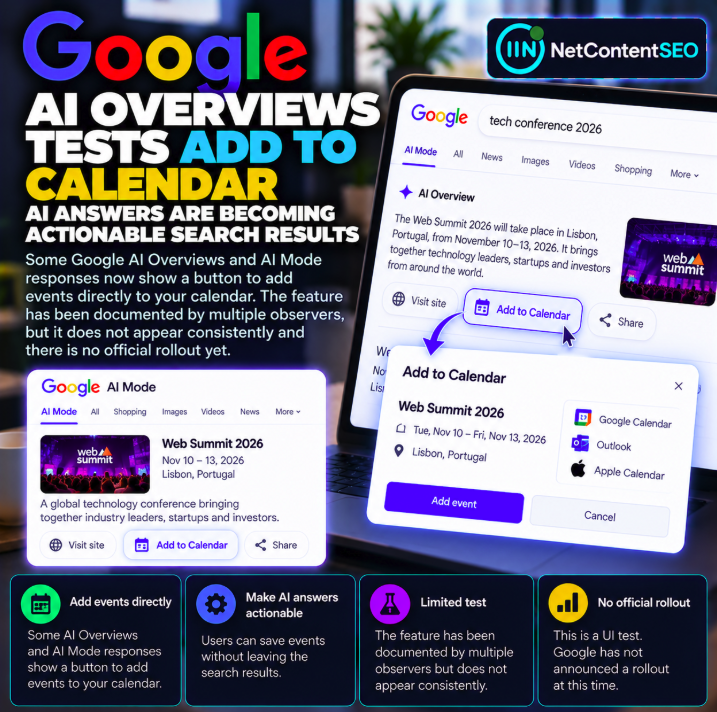
Some Google AI Overviews and AI Mode responses have been spotted displaying an “Add to Calendar” link that could help users save event details directly from an AI-generated search answer. The interface was observed in early October 2026 and documented in reporting published October 7, based on screenshots shared by search observers Khushal Bherwani and Radu Oncescu.
This is an observed interface test, not a confirmed global rollout. The feature has not appeared consistently when the same searches were repeated, and Google has not publicly confirmed general availability in the reporting cited here.
Source: Search Engine Roundtable — Google AI Overviews Add to Calendar Test, October 7, 2026.
What search observers found
Between October 2 and 5, observers reported seeing an option to add events to a calendar within some Google AI-generated search responses. The screenshots were shared by Khushal Bherwani and Radu Oncescu and subsequently covered by Search Engine Roundtable.
The interface reportedly appeared in AI Overviews and AI Mode. However, the same search did not always reproduce the button. This inconsistency is important: it supports describing the feature as a limited test or experimental presentation rather than a feature every user can currently access.
From answers to actions
AI-powered search is often discussed as a way to summarize information. An “Add to Calendar” control points toward a different type of interaction: the answer may become a starting point for completing a task.
For event-related queries, users might want to move from finding a date and location to saving those details. An interface control could reduce the number of steps between discovering information and acting on it.
That is a plausible product direction, but the current observations do not establish the final design, supported calendar services or exactly how event data is transferred.
What is confirmed and what is not?
| Observation | Status |
|---|---|
| An “Add to Calendar” option appeared in some AI-generated Google results | Documented through observer screenshots |
| Examples were associated with AI Overviews and AI Mode | Reported by multiple observers |
| The button appears for all users and relevant queries | Not established |
| Google announced a general rollout | Not confirmed |
| Every major calendar provider is supported | Not established |
| Event publishers receive additional search visibility | Not demonstrated |
Why this matters for event publishers
Event organizers, venues, conferences, cultural institutions and ticketing websites depend on people finding accurate event details. If search answers offer direct actions, correct dates, times and locations may become even more important to the user experience.
However, there is no evidence from this test that Google introduced a new event-ranking factor or that websites with a particular markup will receive an “Add to Calendar” button. The reported experiment concerns interface presentation, not an announced optimization requirement.
Event information quality becomes more visible
Calendar actions rely on accurate details. A wrong date, time zone or venue can create real inconvenience for users. Publishers should ensure that event pages clearly state the event name, schedule, location and any relevant changes or cancellation policies.
Where appropriate, accurate event structured data can help describe event information to search systems, but the observed calendar button should not be interpreted as a guaranteed outcome of implementing Event schema.
Potential implications for SEO and GEO
For search professionals, the experiment illustrates how AI search interfaces may increasingly include task-oriented controls alongside generated summaries and citations. This can change what users do after reading an answer.
Yet the test provides no measured evidence of a change in organic click-through rate, event registrations or citation frequency. Any claim that the button reduces website traffic or improves conversions would require additional data.
What publishers should monitor
- Save evidence of the interface. Record query wording, date, country, device and screenshots when the button appears.
- Check event accuracy. Keep dates, time zones, locations and status information current.
- Review event pages. Make important details accessible and understandable without relying on scripts that fail to render.
- Validate structured data. Use supported event markup accurately where applicable, without assuming it triggers this UI.
- Track actual outcomes. Measure event-page impressions, clicks and registrations separately from the presence of AI-generated controls.
- Watch for official documentation. Update implementation decisions only when Google clarifies availability and requirements.
Could users save events without visiting the source website?
That is one possible implication of an actionable search interface, but the screenshots alone do not establish how often users complete an action, whether they still visit the source or which data source is used for each event.
Researchers should distinguish an available button from actual user behavior. A UI affordance is not the same thing as a measured reduction in referral traffic.
Why inconsistent reproduction matters
Google frequently experiments with search result presentation. A feature observed by a few users may be part of an A/B test, a limited market experiment or another temporary configuration. Without an official announcement, it is premature to describe the interface as a permanent capability.
For SEO reporting, that means screenshots should be dated and contextualized. A single observed result should not be presented as a universal search experience.
Does this change how AI Overviews cite sources?
The current report does not document changes to AI Overview citation selection or ranking. Adding a calendar action to a response is conceptually different from deciding which websites to cite.
A publisher may appear as a source in an AI answer, but that does not establish that the action button is linked to that publisher or that it will send users to the publisher's site.
What has not been announced
- No confirmed global launch date.
- No complete list of supported calendar applications.
- No new event SEO ranking factor.
- No evidence of changed AI citation selection.
- No quantified effect on organic traffic or event conversions.
FAQ
Is Google testing an Add to Calendar button in AI Overviews?
Yes. Multiple observers documented the option in some AI-generated search responses in early October 2026.
Does the feature also appear in AI Mode?
Examples have been reported in AI Mode as well as AI Overviews.
Has Google confirmed a general rollout?
No official general rollout was confirmed in the cited reporting.
Does Event schema guarantee the button?
No. The observations do not establish a schema-based eligibility rule.
Can all users reproduce the button?
No. The feature was not consistently reproducible in repeated searches.
Does the button mean AI Overviews will send less traffic to publishers?
That outcome has not been measured by the reported test.
NetContentSEO analysis
The Add to Calendar experiment is a small but telling example of AI search moving beyond answers toward actions. For event publishers, the immediate priority remains accurate, accessible event information. For SEO researchers, the correct approach is to document the interface carefully and wait for evidence before claiming changes in rankings, citations or traffic.
Source: Search Engine Roundtable, October 7, 2026.