

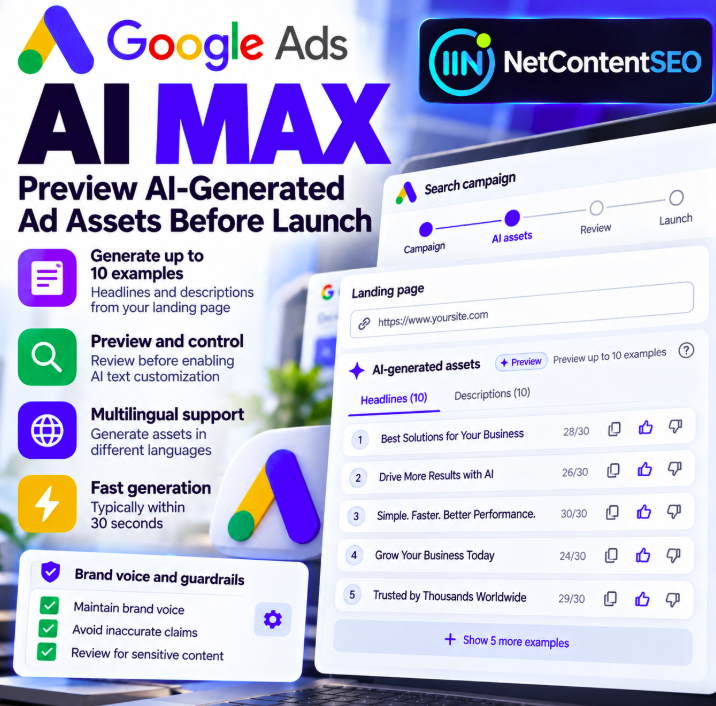
October 8, 2026 — Google Ads has documented a practical new control for AI Max Search campaigns: advertisers can preview AI-generated headline and description examples before enabling text customization. The preview uses a campaign's final landing-page URL to produce a representative sample of up to 10 text assets, making it easier to inspect the tone, accuracy and suitability of generated advertising copy before opting in.
According to Google's official Ads Help documentation, samples are usually generated in under 30 seconds and are supported across text-customization languages, including English, Spanish, Portuguese, Italian, French, German, Japanese and Dutch. The preview does not require advertisers to activate text customization first.
What changed in Google Ads AI Max?
Google has added a preview workflow to the text-customization experience in AI Max for Search campaigns. Instead of turning on automatic text generation without first seeing examples, an advertiser can provide a final URL and inspect representative headlines and descriptions that Google AI might create.
Important: these are examples, not a promise that every previewed asset will serve or that the preview constitutes a full inventory of future generated copy. After activation, Google's systems may generate and refresh assets over time.
How to preview AI-generated headlines and descriptions
- Open an eligible Search campaign using AI Max, or begin creating one.
- Find the Asset optimization section during campaign creation, or the corresponding controls when editing an existing campaign.
- Provide or confirm the campaign's final landing-page URL.
- Review the automatically generated sample of up to 10 headlines and descriptions. If no URL is prefilled, enter one and choose Preview examples.
- Check the examples against your brand voice, factual claims, product availability and applicable advertising policies before enabling text customization.
Why landing-page quality matters
Google says text customization draws from the advertiser's domain, landing page, existing ads and ad-group keywords. It combines extraction of existing information with generative AI. Consequently, outdated prices, vague product descriptions or inconsistent messaging on the landing page can undermine the quality of the generated ad copy. The preview is therefore a useful diagnostic tool for both PPC teams and the people maintaining landing-page content.
Text guidelines: protecting brand voice
Google also describes text-guideline features that can exclude specific words or themes and set restrictions for generated messaging. When guidelines are available and configured, the preview filters example assets accordingly. If the rules are too restrictive, Google may ask the advertiser to adjust them. Google notes that text guidelines have been tested as a pilot, so availability of individual controls may differ between accounts.
Before launching, teams should check that generated text does not invent discounts, imply unsupported guarantees, overstate product performance or use language that conflicts with brand and legal requirements.
What the preview does not do
Previewing examples is not the same as manually approving every future AI-generated ad. Google explains that text customization can continue generating and refreshing assets, with review or refresh at least every 48 hours. Advertisers should monitor the asset details report after activation, rather than assuming a single prelaunch inspection permanently controls all copy.
Practical audit checklist for advertisers
- Claims: Are all benefits, guarantees and offers supported by the landing page?
- Brand voice: Do headlines match the company's preferred tone and terminology?
- Pricing: Are promotions and prices current, correctly qualified and legally compliant?
- Relevance: Does the generated text describe the actual product or service on the final URL?
- Restricted wording: Have sensitive or prohibited terms been excluded where supported?
- Post-launch monitoring: Is someone responsible for reviewing AI-generated assets regularly?
NetContentSEO analysis: a preview is a guardrail, not a guarantee
The real value of this update is the ability to examine Google's proposed advertising language before enabling the feature. It creates a practical checkpoint for brand safety and editorial accuracy, while keeping the advantages of AI-assisted copy generation. Yet a preview is only one part of governance: advertisers still need reliable landing-page content, clear guidelines and ongoing monitoring after activation.
For SEO and PPC teams working together, this reinforces a broader principle: landing pages are not merely destinations; they are also source material for automated advertising systems. Better on-page clarity can make it easier to audit the claims those systems generate.
Official source
Google Ads Help — About text customization in Search campaigns.