

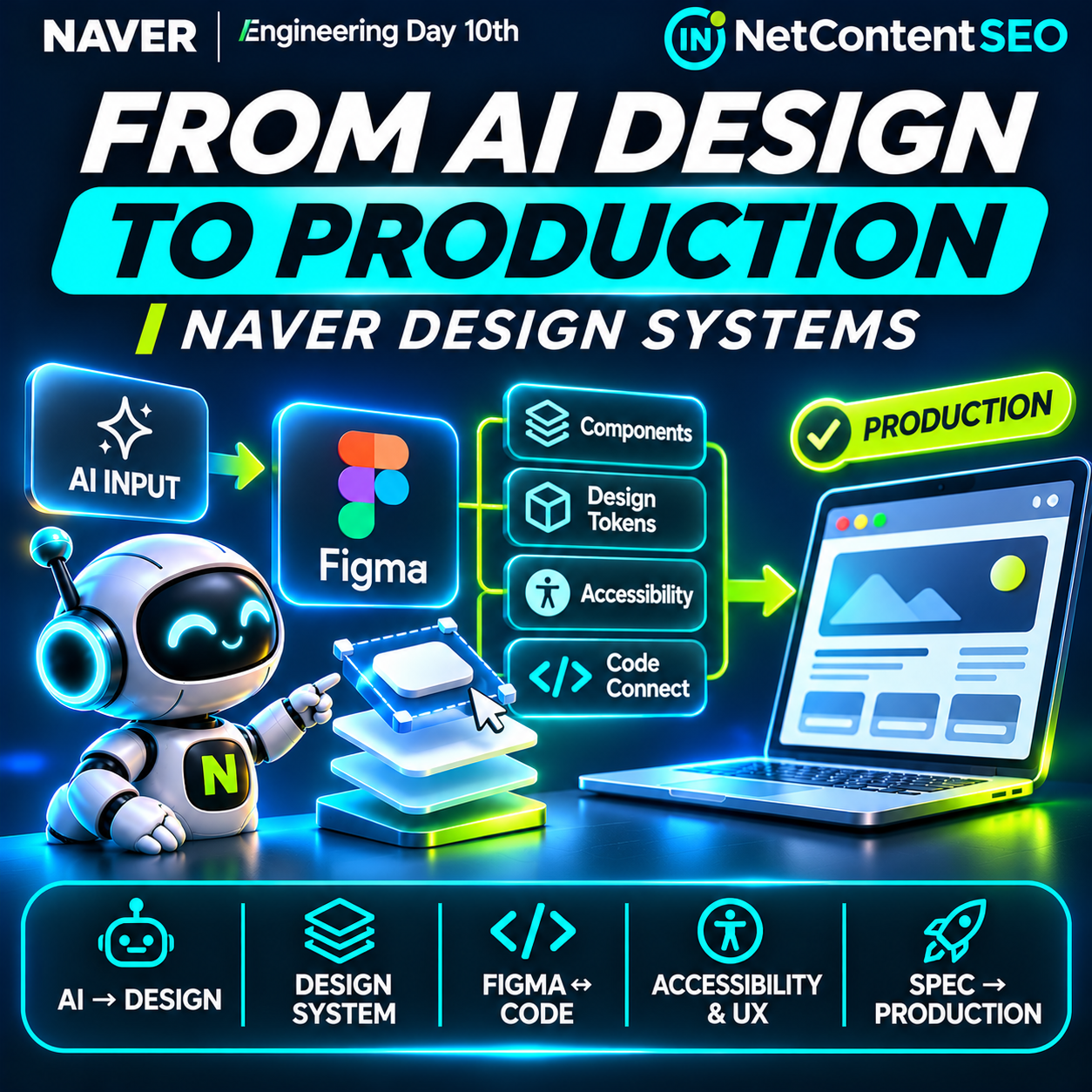
AI can produce a polished interface in minutes. Getting that interface into a real product is a different problem. A NAVER Engineering Day 10th presentation, “From AI Output to Production: How AI and Design Systems Work Together”, outlines an approach that puts Figma, reusable components, design tokens and engineering constraints between generated output and deployable software.
The Korean-language session describes NAVER's approach to connecting specifications, HTML and images to a common design workflow, then linking that workflow to implementation through code components and Figma Code Connect. It is a case study in production engineering rather than an announcement of a new consumer AI search product. For SEO and AI Search professionals, its value is indirect but important: machine-generated interfaces must still preserve accessibility, performance, semantics and dependable user journeys.
Why AI-generated interfaces often stop at the prototype
The session frames the problem around five reasons AI-generated deliverables do not reach production, although the short published session description does not enumerate all five. It identifies recurring gaps that development teams recognize: generated visual output can diverge from established components, fail to express design intent, omit accessibility behavior, overlook interactions and edge cases, or require substantial manual reconstruction before it can ship.
That distinction is crucial. A screenshot that looks correct does not demonstrate keyboard support, validation states, responsive behavior or integration with existing application code. An HTML mockup may appear complete while using incompatible spacing, duplicated components or ad hoc styling. The session's emphasis is therefore not simply on generating more designs, but on reducing the rework between AI output and the team's actual product system.
Why NAVER puts Figma in the middle
The presentation proposes bringing different kinds of AI output—specifications, HTML and images—into Figma. Figma acts as a shared intermediate environment where designers can inspect, refine and connect proposed interfaces to established design-system assets.
That is an architectural choice, not proof that Figma is mandatory for all AI-assisted development. A team with a different design platform could apply similar principles if it has a shared representation of components, design intent and implementation contracts. NAVER's approach is noteworthy because it works within the roles and review processes teams already use rather than assuming AI should replace them.
Components, tokens and design.md: making intent machine-readable
The session highlights three complementary ways of expressing design intent: components, design tokens and design.md. Components provide reusable interface building blocks. Tokens describe shared design values such as colors, typography and spacing. A design.md document can express rules and expectations in a form that AI-assisted tools and human contributors can consult.
The underlying principle is that both the AI and the designer should assemble interfaces from the same vocabulary. Without that shared vocabulary, a model may produce visually similar but technically inconsistent controls, invent new patterns or ignore established interaction rules.
For example, a generated booking form should ideally reuse the site's actual date picker, error messages, button states and responsive grid rather than approximate them from a screenshot. The team can then review whether the generated composition is appropriate without rebuilding every element from scratch.
Connecting Figma to real code
NAVER's description calls out code components that already incorporate accessibility, interactions and edge cases, and the use of Code Connect to connect Figma designs with implementation components. This matters because design-to-code is not just a visual translation task. A button's code must support disabled states, focus behavior, event handling and the surrounding application's conventions.
The session describes demonstrations covering image to Figma, Figma to markup, and Figma versus markup comparison, using a Claude Code plugin named defign-toolkit. These are described as presentation demos; the supplied session summary does not establish that the plugin is publicly downloadable, supported as a commercial product or available outside NAVER.
It also mentions deFign assistant as a way to address Figma's flexibility and improve the workflow, with a longer-term direction of Spec → Code. The source does not provide independently verifiable before-and-after productivity figures, so numerical efficiency claims would be premature.
The broader NAVER engineering context
The approach builds on ideas NAVER has documented in earlier engineering articles. A December 2025 NAVER Financial presentation discussed AI-assisted markup, design-system components, tokens, Code Connect and instructions. An earlier NAVER Search front-end architecture article explained how component metadata, Figma plugins and code generation help teams connect design assets to production implementation.
These references show that the latest session belongs to an ongoing engineering effort rather than a sudden one-click breakthrough. They also help distinguish a documented workflow direction from a fully automated, universally available product.
What changes for web teams using AI coding assistants?
The central operational change is to treat generated output as a candidate implementation that must satisfy established contracts. Teams should not evaluate an AI-produced page solely on whether it resembles a mockup. They should check whether it reuses approved components, follows tokens, respects content structure and passes functional tests.
A useful process starts with a written specification and an inventory of supported components. The AI generates or modifies a candidate layout. Designers validate visual and interaction intent in the shared design environment. Engineers verify the mapping to real components and run tests. Reviewers then assess accessibility, performance and business behavior before release.
This does not eliminate human design or engineering decisions. It makes those decisions more explicit and gives AI tools a constrained environment in which to operate.
Why this matters to technical SEO
Technical SEO often becomes a casualty when generated interfaces are judged only by appearance. An AI-generated page can look attractive while rendering essential content only after fragile JavaScript execution, misusing headings, omitting descriptive links or creating inaccessible navigation. A design-system-driven workflow can help teams enforce semantic patterns across generated pages.
For example, an approved article template can require one meaningful H1, hierarchical headings, real anchor elements for navigation, accessible image alternatives and server-rendered or reliably rendered primary content. A product-card component can enforce valid links and accurate price presentation. These practices support usability and crawling, but the NAVER session does not claim a measured ranking improvement from its design-system workflow.
Structured data should likewise be generated from verified page facts and validated independently. A component library can make correct markup easier to reuse; it cannot make inaccurate or unsupported product information true.
AI Search and GEO: the indirect connection
The session does not describe a new NAVER search-ranking factor, generative search citation system or agent-discovery API. Its connection to GEO is about reliable publishing infrastructure. As teams use AI to create more landing pages, product interfaces and interactive tools, they need ways to keep those outputs consistent, understandable and functional.
That matters when an AI assistant or search engine encounters the resulting website. Clear entity names, stable URLs, readable content, accessible controls and dependable service details reduce ambiguity. But no evidence in the presentation shows that using Figma, Code Connect or design.md directly increases AI citations.
For agentic commerce, the implementation details become even more consequential. A travel assistant may identify a booking service, but a broken form or ambiguous confirmation state can prevent the user from completing the task. Design systems help standardize those interaction patterns, while actual agent compatibility depends on the surrounding site's architecture and integrations.
A practical adoption plan for publishers and product teams
- Audit the current design system. List real production components, variants, design tokens and known accessibility requirements.
- Document intent. Write clear rules for layouts, typography, semantic HTML, responsive behavior, content states and interaction patterns. Use a maintained document such as design.md if appropriate.
- Connect design to implementation. Map Figma components to supported code components through Code Connect or an equivalent process.
- Constrain AI output. Instruct coding assistants to reuse approved components rather than invent parallel implementations.
- Review generated assets. Compare images, Figma layouts and produced markup for structural and behavioral differences.
- Test accessibility. Verify keyboard navigation, focus visibility, labels, contrast, screen-reader semantics and error handling.
- Test real behavior. Exercise mobile layouts, loading states, authentication, forms, API failures and edge cases.
- Validate SEO-critical output. Inspect rendered HTML, canonical URLs, headings, internal links, metadata and structured data where relevant.
- Measure rework. Track time from first generated draft to approved production release, defects found in review and component reuse rates.
- Maintain ownership. Keep designers and engineers accountable for approval, changes and deployment even when AI accelerates implementation.
How to measure whether the workflow works
A team should compare AI-assisted work against its existing baseline. Useful measures include time to production approval, number of review cycles, percentage of reused components, accessibility defects, visual regression failures, escaped production bugs and time spent correcting generated code.
For content-heavy websites, also monitor template consistency, page performance and indexing health. Improvements in these measures can be meaningful operational outcomes, but they should not be automatically attributed to a single plugin or assumed to produce a direct search ranking gain.
Frequently asked questions
What did NAVER announce?
NAVER D2 shared an Engineering Day 10th session about connecting AI-generated design output to production workflows using Figma, design systems, tokens, Code Connect and internal tooling.
Is this a new NAVER AI model?
No. It is an engineering workflow and design-system presentation, not a new foundation-model release.
What is deFign?
The session describes a deFign assistant and a Claude Code plugin called defign-toolkit for working across images, Figma and markup. Public availability and support terms are not established by the short source description.
Does the approach automatically turn every screenshot into production code?
No such guarantee is documented. The presentation focuses on connecting generated artifacts to existing design and implementation systems, with validation still necessary.
Why use design tokens with AI?
Tokens provide a shared vocabulary for visual decisions, making it easier to keep generated interfaces consistent with established product standards.
What is the role of Code Connect?
It links Figma components to their code counterparts, helping designers and developers work from the same reusable building blocks.
Does this improve Google or NAVER rankings?
No direct ranking improvement is claimed. Better implementation quality can support technical SEO fundamentals, but rankings depend on many other factors.
Can publishers apply the same ideas without Figma?
Yes, conceptually. The essential principles are shared components, explicit design intent, implementation contracts and testing. The session itself describes NAVER's Figma-centered approach.
The bottom line
NAVER's presentation addresses a practical bottleneck in AI-assisted software development: a generated design is not a production-ready interface. By connecting specifications, images and markup to Figma, shared components, design tokens and code, the workflow aims to reduce the gap between prototype and deployable product.
For SEO and AI Search teams, the lesson is not that design systems are a new optimization signal. It is that faster AI-generated publishing makes implementation discipline more important, not less. The sites that benefit will be those that preserve semantic structure, accessibility, accurate content and dependable user experiences as automation increases.