

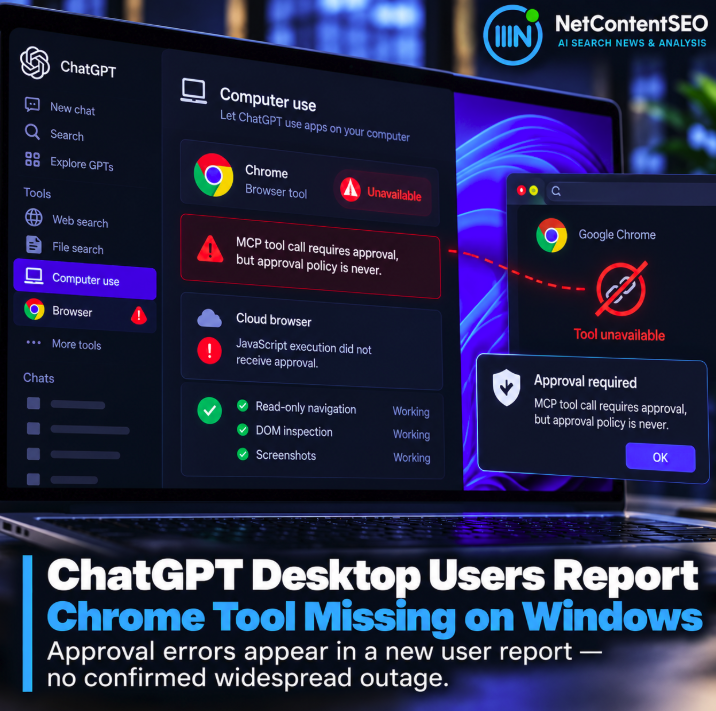

A new user report is highlighting a potentially disruptive failure mode in ChatGPT Desktop on Windows: Chrome automation can become unavailable even though Computer Use, the Chrome integration and the relevant permissions appear to remain enabled.
The report was posted to Reddit's r/ChatGPT on October 7, 2026. It should be treated as an individual user report rather than evidence of a confirmed platform-wide outage, but the details are unusually specific and point toward a possible approval or tool-binding problem. Original Reddit report
Chrome worked earlier, then existing tasks lost the browser tool
According to the user, the computer remained connected and Computer Use was enabled for both Any App and Chrome. The relevant skill was enabled and the Chrome extension was up to date.
Chrome automation had previously worked. Existing tasks later began reporting that the browser tool was unavailable.
That distinction matters because the report does not describe a user who never successfully configured browser automation. It describes a previously functioning setup apparently losing access to one of its tools.
The native Computer Use path returned an MCP approval-policy error
One native Computer Use attempt reportedly returned the message: MCP tool call requires approval, but approval policy is never.
The wording suggests a mismatch between an action requiring user approval and the policy currently governing whether an approval request can be presented.
However, there is no public evidence from this report alone establishing where that mismatch originated or whether it is a ChatGPT Desktop bug, a task-state issue, a local configuration problem or another component in the Computer Use stack.
A manual approval-policy change made the desktop app fail to open
The user says they tried a suggested local configuration change from an approval policy of never to on-request.
After that modification, ChatGPT Desktop reportedly would not open. Reverting the change allowed the application to launch again.
This is an important reason not to treat undocumented local configuration edits as a universal fix. An internal or unsupported setting may have dependencies that are not visible to the user.
The cloud browser showed a second approval problem
The same user also reported intermittent cloud-browser failures with the message JavaScript execution did not receive approval, despite no approval prompt appearing.
Later, read-only browser operations reportedly worked again, including navigation, DOM inspection and screenshots.
It is not known whether the cloud-browser approval behavior and the missing local Chrome tool have the same root cause. The overlap is nevertheless notable because both involve actions whose availability can depend on tool permissions and approval state.
Other users have reported tool availability regressions before
This is not the first community report of ChatGPT Desktop temporarily losing browser or Computer Use capabilities after previously working.
In July 2026, a separate user reported that Browser, the Chrome plugin and Computer Use became unavailable together after a desktop update. That user later said a subsequent application update restored the functionality.
Another recent Windows report described the opposite pattern: browser automation remained available while native Windows application inventory returned no applications.
These reports involve different versions and symptoms, so they should not be combined into a single confirmed bug. They do show that tool discovery and availability can fail independently from the underlying browser or operating system.
Existing tasks may retain stale tool state
The new report raises an interesting architectural question for agentic workflows: what happens when the tool environment changes after a task has already been created?
If an existing task retains an outdated tool inventory, permission state or binding, restarting the browser extension alone may not be sufficient. Conversely, if tool discovery occurs dynamically, a backend or desktop-client failure could make an otherwise installed tool temporarily disappear.
The Reddit user specifically asked whether there is a supported way to refresh or rebind browser tools for an existing task.
This matters more as ChatGPT moves from answers to actions
Browser automation failures are fundamentally different from a conventional chatbot error.
If ChatGPT is being used to navigate websites, interact with business tools or complete multi-step workflows, a missing browser capability can stop the entire process even when the model itself remains available.
Reliability therefore increasingly depends on several layers at once: model availability, desktop-client state, tool discovery, permissions, approval handling, browser connectivity and the task's own execution context.
Approval UX is part of agent reliability
The reported JavaScript error is especially relevant. Safety-sensitive actions should require approval when appropriate, but an approval requirement only works if the interface can actually present the user with the approval request.
A state in which an action requires approval while the approval prompt cannot appear effectively converts a safety mechanism into an execution deadlock.
That does not imply that safeguards should be weakened. It means approval systems need predictable failure handling and a clear recovery path.
No confirmed widespread outage yet
At publication time, this should not be described as a confirmed widespread ChatGPT Windows outage.
The primary evidence is a detailed community report, supported by other reports of different Computer Use and browser-tool regressions in recent months. There is not enough evidence to conclude that all or most Windows users are affected.
For that reason, users encountering similar behavior should avoid changing undocumented security or approval settings solely on the basis of community advice.
The NetContentSEO takeaway
The interesting part of this case is larger than one missing Chrome tool. As ChatGPT becomes an agent platform, tool availability itself becomes part of product uptime.
A model can be online and responding normally while an agentic workflow is effectively down because its browser, application or approval layer is unavailable.
For teams building workflows around Computer Use, MCP and browser automation, monitoring should therefore include not only whether ChatGPT responds, but whether the required tools are still discoverable, authorized and executable.
AI-agent reliability is increasingly the reliability of the entire tool chain, not just the model.