

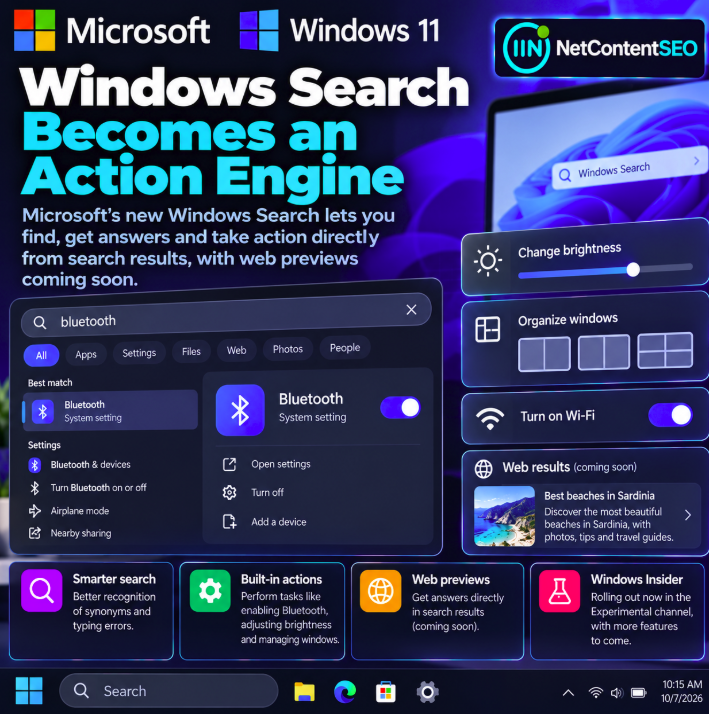

Microsoft is testing a redesigned Windows Search experience that moves beyond finding files and settings toward performing actions directly from search results. Announced October 7, 2026, the new experience is built with WinUI 3 and introduces improved handling of synonyms and typing mistakes alongside direct actions such as turning on Bluetooth, changing screen brightness and arranging windows.
The initial rollout is limited to the Windows Insider Experimental channel. Microsoft also previews richer web results capable of showing answers directly within search, but those advanced web previews are planned for a later stage rather than being part of the fully available feature set on announcement day.
Primary source: Microsoft Windows Insider Blog — From Searching to Doing: Building a Faster, More Streamlined Windows Search.
From searching to doing: what changes in Windows Search?
Traditional operating-system search is primarily navigational: a user types a name and opens a file, application or settings page. Microsoft's new direction places more actions within the search interface itself, reducing the need to navigate to a separate control panel or window for common tasks.
The distinction is subtle but meaningful. Search becomes not just a list of destinations, but a surface where certain tasks can be completed. The announcement illustrates this with device settings and window-management operations.
Key features announced October 7
| Feature | What Microsoft describes | Release status |
|---|---|---|
| WinUI 3 interface | Rebuilt Windows Search experience | Testing in Windows Insider Experimental |
| Smarter query matching | Improved recognition of synonyms and typing errors | Part of the announced search improvements |
| Bluetooth actions | Control Bluetooth from search | Included in the action-focused experience |
| Brightness actions | Adjust display brightness from search | Included in the announced examples |
| Window arrangement | Organize windows directly from search | Included in the announced examples |
| Rich web previews | Answers and richer web information inside results | Coming later |
The supplied announcement does not establish an exact date for general availability or for the later rich web preview release.
Why synonyms and typo tolerance matter
People do not always use the exact labels that an operating system assigns to a setting or feature. A user may describe an action in everyday language or make a spelling mistake while typing. Better synonym recognition and typo tolerance can make search more forgiving and reduce the need to know the official name of a control.
This is a usability improvement rather than proof of a new generative AI ranking system. The announcement describes more effective query understanding within Windows Search, not a specific new large language model or an undisclosed web ranking algorithm.
Direct actions: Bluetooth, brightness and window layouts
Microsoft highlights practical tasks that can be completed from the search experience. For example, a user searching for Bluetooth can reach a relevant control without manually locating it through multiple settings screens. Similar interactions are described for display brightness and organizing windows.
These examples illustrate a broader interface pattern: the search result becomes an action surface. A search box that helps users complete a task can be more useful than one that simply points them to the place where the task might be completed.
Actual controls and availability may vary by build, device capabilities and the experimental rollout. The announcement should not be interpreted as confirmation that every Windows setting can already be changed directly from search.
WinUI 3 provides the interface foundation
Microsoft identifies WinUI 3 as the technology behind the refreshed Windows Search experience. WinUI 3 is part of Microsoft's modern Windows application interface stack and supports contemporary UI patterns for native Windows experiences.
Using WinUI 3 is relevant to the design and responsiveness of the search interface, but it does not by itself reveal how every search result is ranked or how future web answers will select sources.
Rich web previews: answers inside Windows Search are coming
The most interesting longer-term development for publishers is Microsoft's plan to bring richer web previews and answers directly into Windows Search results. That would extend the search interface beyond local device navigation toward information retrieval from the web.
However, the announcement describes these advanced web experiences as upcoming. It does not provide a confirmed rollout date, full source-attribution specification or a public ranking methodology for those answers.
Consequently, it would be premature to claim that a particular website can already optimize for these previews, that publishers will receive a specific type of citation or that Windows Search will drive measurable referral traffic through the new experience.
Why this matters for SEO and AI Search
For SEO teams, the development is worth watching because it illustrates a wider shift from search as navigation to search as task completion. When users can act on a result immediately, the relationship between a search impression, a click and a completed task may change.
Windows Search is not identical to Bing Search, Google Search or a conversational AI assistant. The fact that Microsoft is planning rich web answers within the operating system does not establish that those answers will use the same ranking, citation or indexing systems as any other Microsoft product.
Publishers should therefore monitor the eventual web preview implementation before making claims about organic traffic or GEO opportunities. Relevant questions include which sources appear, whether URLs are clickable, how snippets are generated and whether the experience exposes useful attribution.
What the Experimental rollout means
Microsoft says testing began October 7 in the Windows Insider Experimental channel. That is an early testing environment, not a general rollout to all Windows users. Features may change during testing, and availability can depend on the specific build and rollout conditions.
The presence of a feature in an Insider announcement does not guarantee that it is enabled on every eligible device immediately. Users should consult the latest Windows Insider documentation for build-specific details.
Questions for publishers and researchers to monitor
- Source attribution: Will future web previews clearly identify the original publisher?
- Click behavior: Can users open the cited page, and how prominently is that option displayed?
- Answer generation: Are web previews excerpts, summaries or dynamically generated answers?
- Coverage: Which query types trigger web previews, and does behavior vary by locale?
- Measurement: Will publishers be able to distinguish traffic from Windows Search?
- Consistency: How do results compare with standard web search and other Microsoft AI products?
These are research questions, not features confirmed by the announcement.
What the release does not establish
- It does not announce immediate general availability for all Windows users.
- It does not say rich web previews are fully available on October 7.
- It does not document a new Google or Bing ranking factor.
- It does not guarantee traffic or citations for publishers.
- It does not show that every operating-system action can be performed through search.
FAQ
When did Microsoft begin testing the new Windows Search?
October 7, 2026, in the Windows Insider Experimental channel.
What technology powers the redesigned interface?
Microsoft says the new experience is built using WinUI 3.
What actions can users perform from search?
Microsoft gives examples including Bluetooth controls, screen brightness adjustments and window organization.
Does the new search understand misspellings and synonyms?
The announcement describes improvements in recognizing typing errors and alternative terms.
Are rich web answers available to everyone now?
No. Microsoft describes advanced web previews as a future addition, while the initial experience is in an experimental Insider rollout.
Does this change SEO rankings?
The announcement does not establish a new web ranking algorithm or citation policy.
NetContentSEO analysis
Microsoft's Windows Search update reflects an important interface shift: users increasingly expect search to help them complete a task, not simply locate a destination. For publishers, the most consequential part may come later, when rich web previews begin presenting answers within the operating-system search interface. Until Microsoft documents how those previews work, SEO and GEO implications remain opportunities for observation rather than confirmed ranking or traffic effects.
Primary source: Microsoft Windows Insider Blog — From Searching to Doing: Building a Faster, More Streamlined Windows Search, October 7, 2026.