

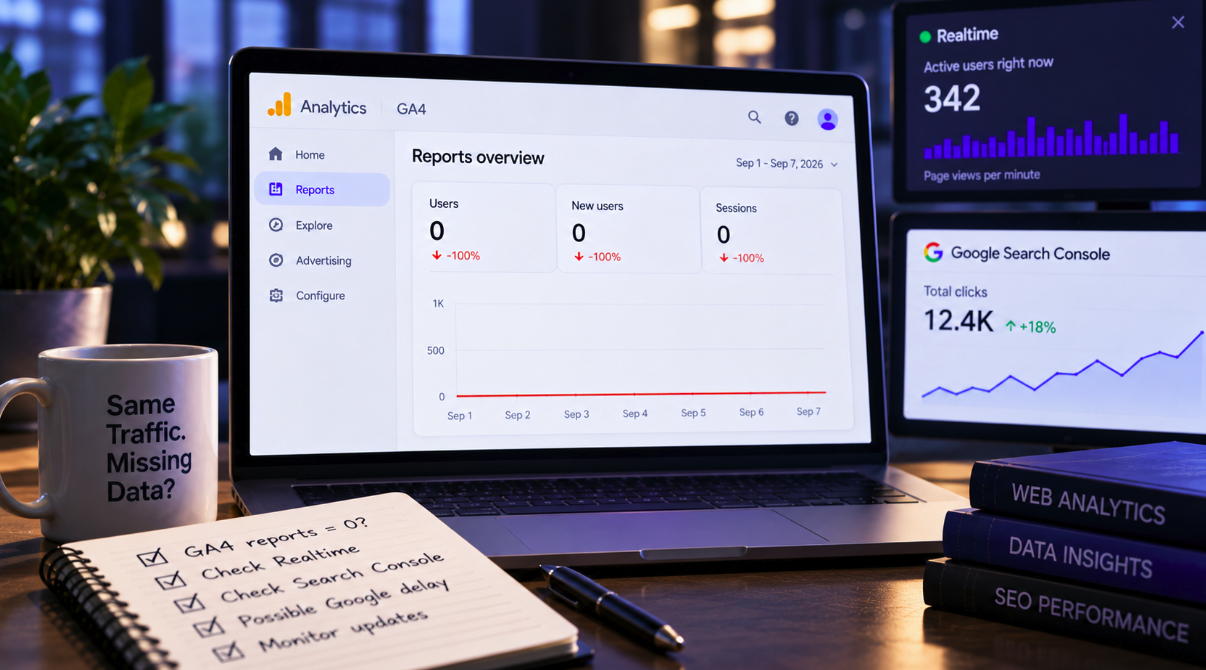

If your GA4 reports suddenly showed zero traffic—or a dramatic collapse—starting on September 1, 2026, the first conclusion should not be that your website lost its audience overnight.
Multiple Google Analytics users have reported missing or severely understated data in standard GA4 reports since the beginning of September, while other signals continued to show that visitors were arriving. In several cases, GA4 Realtime remained active, Google Search Console continued recording normal organic clicks, and independent analytics, server or commerce systems showed no corresponding collapse.
The pattern points toward a Google-side reporting or processing problem affecting at least some GA4 properties rather than a universal real-world traffic loss. Google Analytics Product Experts responding in the official community repeatedly described the issue as a delay on Google’s end, and one Diamond Product Expert said on September 3 that Google was aware of the problem.
The distinction matters because a broken analytics report can trigger exactly the same alarms as a genuine SEO, advertising or website failure. Before changing campaigns, rolling back deployments or escalating a traffic emergency, teams need to determine whether the audience disappeared—or whether GA4 simply has not finished showing it.
The problem began appearing around September 1
Complaints surfaced quickly after the start of the month. One Google Analytics Community report described a standard GA4 property whose normal processing stopped on September 1 at 03:14 local time. Standard reports and the Data API stopped showing new rows, yet Realtime continued to display page views, session starts and custom events.
The site owner had already ruled out many of the usual causes. There had been no recent configuration change, the GTM container and measurement ID were unchanged, another property in the same Analytics account was processing normally, and both the interface and Data API showed the same gap.
Raúl Revuelta, a Diamond Product Expert for SEO and digital analytics in Google’s community, replied that other users were experiencing the same behavior and that it appeared to be a delay on Google’s end.
A second community thread reported essentially the same split: standard GA4 reports showed no or very limited traffic from September 1, while Realtime, Search Console and other tracking platforms continued working normally.
Some properties showed zero; others were heavily undercounted
The incident does not appear identical across every report.
Some users saw an almost perfect cliff to zero in standard reports. Others reported severe undercounting rather than a total absence of data. One ecommerce publisher said GA4 had been under-reporting users, sessions, page views and purchase events by more than 70% since September 1 even though CDN traffic, origin-server activity, Search Console clicks, advertising platforms and ecommerce orders remained broadly normal.
The site’s developers found no deployment or analytics configuration change coinciding with the drop, and browser tests continued to show requests being sent to GA4’s collection endpoint. Revuelta again answered that other users were experiencing the issue and described it as a Google-side delay.
That variation is important. Analysts should not look only for a chart that reaches exactly zero. A sharp, implausible decline can represent the same class of reporting problem when independent evidence shows that the underlying business activity continued.
Realtime is one of the strongest diagnostic clues
When standard reports show no traffic but GA4 Realtime continues to display active users and events, the two views are telling you different things about the measurement pipeline.
Realtime activity strongly suggests that events are still reaching Google Analytics. Standard reports depend on additional processing before those events appear in the historical reporting layer.
A gap between the two therefore points away from a simple “the tag stopped firing” explanation and toward a processing or reporting delay.
It is not absolute proof. One affected publisher also reported Realtime volumes substantially below what server-side evidence suggested, so the incident may not manifest identically for every property. But when Realtime looks normal and yesterday’s standard report is empty, teams should investigate processing before treating the graph as a real traffic event.
Search Console can prevent a false SEO emergency
Google Search Console is especially useful when the apparent collapse involves organic traffic.
If GA4 reports zero organic sessions while Search Console continues recording a normal level of Google clicks, those two observations cannot both describe a genuine disappearance of search traffic.
The metrics are not directly interchangeable. Search Console counts search clicks under its own methodology, while GA4 measures sessions and events after users reach the site. Differences between them are normal.
But a stable Search Console trend alongside an abrupt 70% or 100% GA4 decline is powerful evidence that teams should investigate analytics before diagnosing a ranking collapse.
This is exactly what several September reports showed: Search Console and other systems remained broadly normal while GA4’s processed data fell away.
Some missing days were later backfilled
One of the most encouraging pieces of evidence came from a third Google Analytics Community discussion.
The user initially reported that September 1 showed zero across major standard-report metrics while Realtime continued working. The following update said September 1 was eventually processed, then September 2 initially showed zero and was processed later. The pattern subsequently repeated for September 3.
Revuelta responded that Google was aware, that the issue was affecting more than one property and that similar processing incidents in the past had taken a couple of days to resolve.
That does not guarantee every missing event will be restored for every affected account. It does, however, provide concrete evidence that at least some of the apparent September data loss was delayed data rather than permanently lost traffic.
Product Expert comments are useful, but they are not an incident report from Google
The Google Analytics Community responses deserve careful wording.
Product Experts are experienced contributors recognized within Google’s community programs, and their repeated identification of a Google-side delay is valuable evidence. But their posts are not equivalent to a formal engineering incident report, root-cause analysis or public statement from the Google Analytics product team.
As of this article’s publication, we found no official Google Analytics announcement explaining the root cause, full scope or exact recovery timeline for the September reporting problem.
That uncertainty means publishers should avoid overgeneralizing. The widespread reports make a platform-side issue highly plausible, but any individual site can still suffer a real tracking failure or traffic decline at the same time.
Do not “fix” a healthy implementation because a report is late
One of the biggest risks during an analytics outage is making unnecessary changes in response to bad telemetry.
If Realtime shows events, browser network requests reach GA4, Search Console remains stable and no deployment occurred when the decline began, immediately changing tags or consent configuration can introduce a real tracking problem on top of the reporting problem.
The better response is diagnostic discipline.
Check whether the GA4 measurement ID is still present. Confirm events in Realtime and DebugView where appropriate. Review Tag Manager publishing history and GA4 property change history. Compare Search Console, ecommerce orders, ad-platform clicks, CDN statistics, server logs and any independent analytics platform available to the business.
If those systems collectively say activity continued, document the GA4 discrepancy and wait for processing before making destructive changes.
Do not pause marketing because one dashboard says zero
The same principle applies to business decisions.
An executive seeing a 100% traffic decline may reasonably want campaigns paused, developers called and SEO teams mobilized. But if paid platforms still record clicks and conversions, orders remain normal and Realtime users are active, pausing acquisition can turn a measurement problem into a revenue problem.
GA4 should be an important source of evidence, not a single point of truth capable of overriding every other operational signal.
This incident is a useful reminder to build measurement redundancy before an outage happens. Search Console, advertising platforms, backend transactions, CRM data, server logs and analytics each observe different parts of the customer journey. Their disagreement is often diagnostic information in itself.
Daily reports should be annotated, not silently rewritten
Agencies and in-house analytics teams producing September reports should flag the affected period explicitly.
If data is later backfilled, a dashboard exported on September 2 may not match the same dashboard viewed several days later. Without an annotation, stakeholders can misinterpret the revised numbers or assume the analyst made an error.
A simple reporting note can state that GA4 experienced apparent processing delays beginning September 1, that the business cross-checked other traffic sources and that figures for the affected dates remain provisional until processing stabilizes.
This is particularly important for automated dashboards and scheduled executive emails, which can distribute an alarming zero before a human analyst has examined whether it makes sense.
A traffic collapse should leave evidence outside GA4
Real traffic failures usually have multiple footprints.
A major SEO loss should normally become visible in Search Console clicks, rankings or impressions. A website outage should appear in uptime monitoring, server traffic and revenue. A broken advertising campaign should be visible in the ad platform. A checkout failure should affect orders or backend conversion records.
If GA4 alone reports catastrophe while every independent source remains healthy, the inconsistency is the story.
That does not mean GA4 can be ignored. It means the analyst should determine which system is failing to describe reality before reacting.
The September 1 problem is a warning about analytics dependency
Google Analytics is so deeply embedded in marketing operations that its numbers often become synonymous with website performance. The September reporting problems expose the danger in that assumption.
An analytics platform does not create traffic. It observes, processes and reports signals about traffic. When that processing layer is delayed, a healthy website can look empty.
For the affected GA4 users, the most important metric in early September may therefore be the one that did not collapse: Realtime activity, Search Console clicks, server requests, transactions or another independent source confirming that people were still there.
Until Google’s processing fully catches up and the scope of the incident becomes clearer, teams should treat suspicious September 1 onward GA4 gaps as something to verify—not automatic proof that their audience vanished.