

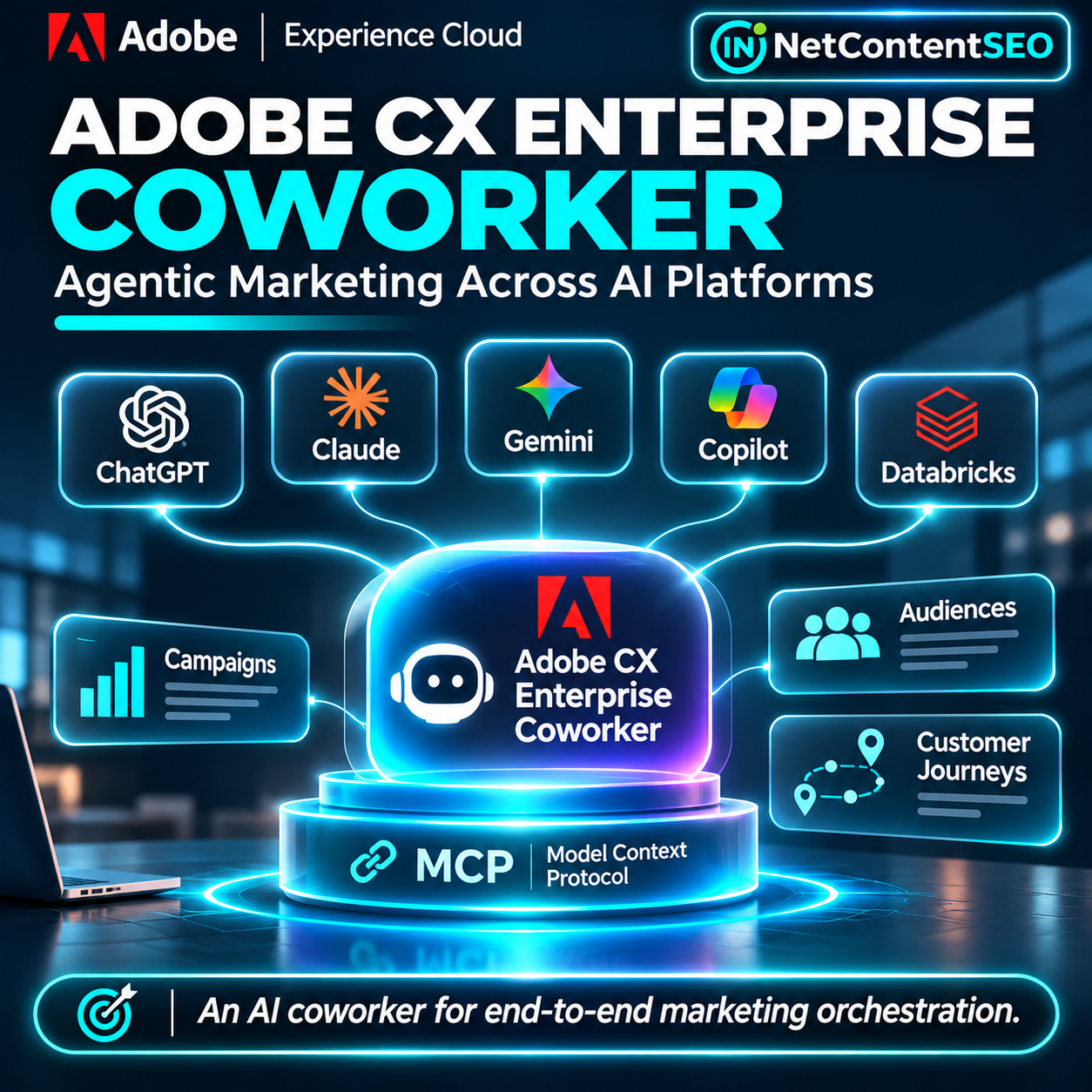
November 6, 2026. Adobe has expanded CX Enterprise Coworker into several major AI work environments, including ChatGPT, Claude, Gemini for business, Microsoft Copilot and Databricks Genie. The November 4 announcement is an important development for enterprise marketing: teams can ask questions about their campaigns, audiences and customer journeys inside the AI assistant they already use, while Adobe provides the business context and governed access behind the answer.
This is not a free general-purpose Adobe assistant for every ChatGPT user. The integration requires an existing Adobe CX Enterprise Coworker entitlement, appropriate Adobe Experience Platform products, user permissions and administrator approval. Adobe also distinguishes the read-only insights exposed through supported AI-platform integrations from the wider workflow execution capabilities available in its broader Coworker ecosystem.
What Adobe announced on November 4
In its official announcement, Adobe confirmed that CX Enterprise Coworker is available within ChatGPT as a plugin, Claude, Databricks Genie, Gemini for business and Microsoft Copilot. Integrations with Amazon Web Services, IBM and Snowflake were described as coming next. These distinctions matter: an announced future integration should not be described as universally available today.
Adobe also introduced prebuilt Model Context Protocol (MCP) connectors to business systems including Amazon Ads, Databricks Genie, Demandbase, Meta advertising tools, Microsoft Work IQ, RainFocus and Snowflake Cortex AI. These connectors are designed to reduce custom integration work and allow cross-system marketing workflows.
Adobe says agencies including dentsu, Havas, Omnicom, Publicis, Stagwell and WPP, as well as major systems integrators, are building customized enterprise solutions around the platform. These are vendor-reported ecosystem relationships, not independently verified performance outcomes for every deployment.
What is CX Enterprise Coworker?
Adobe introduced CX Enterprise Coworker as generally available in June 2026. It is positioned as an agentic layer for customer experience orchestration: bringing together business context, marketing data, audience information and operational workflows across Adobe and third-party applications.
Instead of asking an assistant for generic campaign ideas, an authorized marketer can request analysis grounded in the organization's actual audiences and performance information. In the broader Adobe environment, the product can also coordinate planning, approvals and execution with human oversight. The newly announced AI-platform connections make selected capabilities accessible without leaving a preferred assistant.
Where is Adobe Coworker available?
| Platform | Adobe's November 4 status | Practical consideration |
|---|---|---|
| ChatGPT | Available as an Adobe CX Enterprise Coworker plugin | Organization approval and Adobe authentication required |
| Claude | Available through a connector | Admin approval and supported account access required |
| Gemini for business | Available through enterprise agent access | Organization publication and permissions apply |
| Microsoft Copilot | Announced as available | Confirm tenant configuration and product entitlements |
| Databricks Genie | Announced as available | Requires appropriate workspace and integration permissions |
| AWS, IBM and Snowflake AI environments | Further availability expected | Do not assume immediate access |
Adobe's platform setup documentation is the best source for current prerequisites and instructions, which may change as additional environments are enabled.
How to connect Adobe Coworker to ChatGPT
Adobe documents a straightforward setup, but it begins with enterprise administration rather than a consumer download.
- Confirm your organization has Adobe CX Enterprise Coworker provisioned and that your Adobe identity has access.
- Confirm the organization has Adobe Experience Platform and at least one of Adobe Real-Time CDP, Adobe Journey Optimizer or Adobe Customer Journey Analytics.
- Ask the ChatGPT administrator to approve Adobe CX Enterprise Coworker for the relevant users or organization.
- Open ChatGPT's Plugins catalog, find Adobe CX Enterprise Coworker and install the approved plugin.
- Authenticate with the Adobe identity that holds the appropriate entitlements.
- Start with a read-only question, such as comparing campaign performance or identifying the largest audiences, and verify the results against Adobe's original dashboards.
If the plugin does not appear, check administrator approval, product access and account eligibility before assuming a service outage. Adobe advises signing out and signing back in to refresh authentication when access errors occur.
How MCP and A2A fit into the architecture
Model Context Protocol (MCP) provides a standardized way for AI applications to connect to tools and external information sources. Adobe uses MCP to expose Coworker capabilities to supported AI platforms and to integrate partner systems without building an entirely separate interface for each combination.
Agent2Agent (A2A) addresses communication between agents and agent-based workflows. Together, these standards support Adobe's stated goal of flexible, interoperable orchestration. However, support for open standards does not mean every Adobe customer can connect any arbitrary custom agent or tool.
Adobe's documentation explicitly states that Coworker cannot currently be connected to a custom agentic harness outside the supported AI platforms. Teams requiring an unsupported environment should contact Adobe rather than assume a public MCP endpoint grants unrestricted third-party access.
What can marketers actually do?
The documented AI-platform use cases include reviewing campaigns, comparing performance, analyzing journeys, identifying audiences, forecasting, checking campaign readiness and generating visual reports. Consider three examples.
Campaign performance analysis
A marketing manager asks: “Compare last month's campaign performance with the previous month and identify the touchpoints associated with conversions.” Coworker can draw on permitted Adobe data to summarize patterns. The manager should check date ranges, attribution models and definitions before changing spend.
Audience planning
A retailer asks: “Which of our audience segments grew fastest this quarter, and which are most engaged?” This can speed up planning meetings, but it does not establish that an audience will respond profitably to a new campaign. Forecasts require validation against actual outcomes.
Customer journey diagnosis
A team asks: “Where are users dropping out of our current journey?” Coworker can surface relevant journey data and help prioritize investigation. Teams should confirm tracking quality, consent coverage and whether observed drop-offs are meaningful before launching changes.
What can the AI-platform integration not do?
This is a crucial distinction in Adobe's official documentation. Coworker inside supported AI platforms currently provides read-only insights and does not modify customer data. The broader CX Enterprise Coworker system is described as capable of coordinating agentic workflows and actions across connected tools, but that does not mean every action is available from every external assistant.
Adobe also notes that the Firefly Image Generation skill is unavailable when Coworker is accessed through Claude, although it remains available in the Coworker interface and other supported platforms. This is a specific documented limitation, not a blanket claim that Adobe Firefly is unavailable in Claude through every possible product.
Before promising automated campaign launches or customer-record updates from ChatGPT, verify that the exact action is supported by the installed integration and permitted by organizational policy.
How much does Adobe Coworker cost?
Adobe says there is no additional charge specifically for using Coworker in supported AI platforms beyond the organization's existing Coworker license. However, activity draws from the same AI credits used by other Coworker features. “No additional integration fee” is therefore not equivalent to unlimited free use.
Adobe's June announcement described CX Enterprise Coworker as a standalone offering or add-on for new and existing Adobe customers, with introductory pricing and usage-based scaling. The public materials reviewed do not establish a universal fixed subscription price suitable for every organization. Buyers should request an Adobe quote and confirm licensing, AI credit consumption, platform access and overage policies.
Security, permissions and governance
According to Adobe, the AI-platform integration inherits the data access and permissions of the user's Adobe identity. An employee should see only the information they are entitled to access in Adobe Experience Platform and related products. The integration does not require a separate set of data permissions in the AI platform.
That is an important architectural safeguard, but organizations still need to review how authentication, audit logs, consent, retention and third-party AI-platform policies apply to their deployment. Adobe's documentation instructs users to review generated analyses before making business decisions.
Administrators should test permission boundaries with representative roles, including users who should not have access to sensitive audience segments. They should also document which prompts, outputs and business decisions are reviewed by humans.
What this means for SEO and AI Visibility
The most important SEO implication is not a new ranking factor. Adobe has not announced changes to Google Search ranking, indexing or ChatGPT citation selection. Instead, Coworker represents a shift in how marketing teams access and act on business intelligence.
SEO performance data, paid-media data, audience information and customer journeys increasingly need to be interpreted together. A site can receive traffic but fail to convert; an AI answer can create brand awareness without producing a directly attributable visit. An agentic marketing layer may help teams investigate these cross-channel questions, provided the underlying data sources are connected and the measurements are valid.
For GEO and AI Visibility practitioners, the strategic lesson is that being understood by AI systems and being measurable inside enterprise workflows are separate challenges. A company's presence in an AI answer does not automatically translate into conversions, and a sophisticated AI workflow cannot recover information that was never collected or attributed.
There is also an operational shift: the assistant interface may become the place where a marketer asks a question, while Adobe and other enterprise platforms remain the systems that hold customer data and enforce access rules. This reduces some interface switching, but it also makes integration quality and data governance central to the usefulness of AI agents.
How to evaluate Adobe Coworker before deployment
- Confirm entitlements: verify CX Enterprise Coworker, Adobe Experience Platform and at least one required companion product.
- Select a supported AI platform: confirm availability for the exact organization, tenant and user group.
- Define two measurable pilot tasks: for example, campaign performance review and audience growth analysis.
- Establish baselines: record the time, accuracy and manual effort required before integration.
- Check permission boundaries: verify that users cannot retrieve Adobe data beyond their authorized scope.
- Validate outputs: compare summaries, figures and forecasts with source dashboards and documented metric definitions.
- Track costs: monitor AI credits, license conditions and any separate AI-platform expenses.
- Review limitations: distinguish read-only analysis in external assistants from workflow actions available elsewhere in Adobe's ecosystem.
- Decide whether to scale: assess time saved, accuracy, governance and business outcomes rather than relying on vendor case-study claims.
What remains uncertain?
Adobe has confirmed product availability and integration architecture, but its announcement does not establish independent improvements in conversion rates, campaign ROI or customer lifetime value for every customer. Nor does it provide one universal price or guarantee that all announced integrations expose identical capabilities.
Some partners are listed as future availability, and the exact feature set depends on the supported platform, organizational configuration and Adobe entitlements. The official documentation should be consulted at implementation time rather than treating the November announcement as a permanent compatibility matrix.
Frequently asked questions
Is Adobe CX Enterprise Coworker available in ChatGPT?
Adobe says yes, as a plugin for eligible enterprise users. Your organization must have the required Adobe products, and the ChatGPT administrator must approve access.
Can I use Adobe Coworker with a free ChatGPT account?
Adobe's documentation does not establish universal access for consumer accounts. The integration requires an organization's provisioned CX Enterprise Coworker license and related Adobe Experience Platform products.
Is Adobe Coworker free to connect?
Adobe says supported AI-platform integration adds no separate Coworker charge, but usage consumes the organization's existing AI credits and requires the underlying licensed products.
Does the ChatGPT integration modify customer records?
Adobe's current documentation describes Coworker in supported AI platforms as providing read-only insights without modifying customer data. Do not confuse that with the broader orchestration features of the Coworker platform.
What is the role of MCP?
MCP helps connect supported AI applications with Coworker tools and business context using a common protocol. It does not imply unrestricted access to every custom AI agent.
Can Adobe Coworker improve Google rankings?
No direct ranking improvement is announced. Its value for SEO teams is potentially better analysis and coordination of marketing data, not a new search optimization signal.
Which integrations are coming later?
Adobe's November 4 announcement says additional availability in AWS, IBM and Snowflake environments is expected. Check Adobe's current documentation for release status.
The bigger picture: AI assistants become business interfaces
Adobe's expansion shows how enterprise AI is moving beyond isolated chatbots. A marketer may work in ChatGPT, Claude or Copilot while Adobe supplies the governed data and domain-specific capabilities needed to answer meaningful business questions.
The competitive advantage will not come simply from adding another assistant icon to a workflow. It will come from reliable integrations, permission-aware access, validated metrics and measurable improvements in decisions. Agentic marketing starts to become useful when the assistant can work with real business context—and when people can verify what it says.
Sources
- Adobe, November 4, 2026: CX Enterprise Coworker integrations — official announcement.
- Adobe Experience League: CX Enterprise Coworker for AI Platforms — prerequisites, setup, pricing conditions and limitations.
- Adobe, June 10, 2026: Coworker general availability — product and pricing background.
- ContentGrip: Adobe Coworker AI integrations — secondary coverage supplied by the reader; page content was not independently accessible during research.