

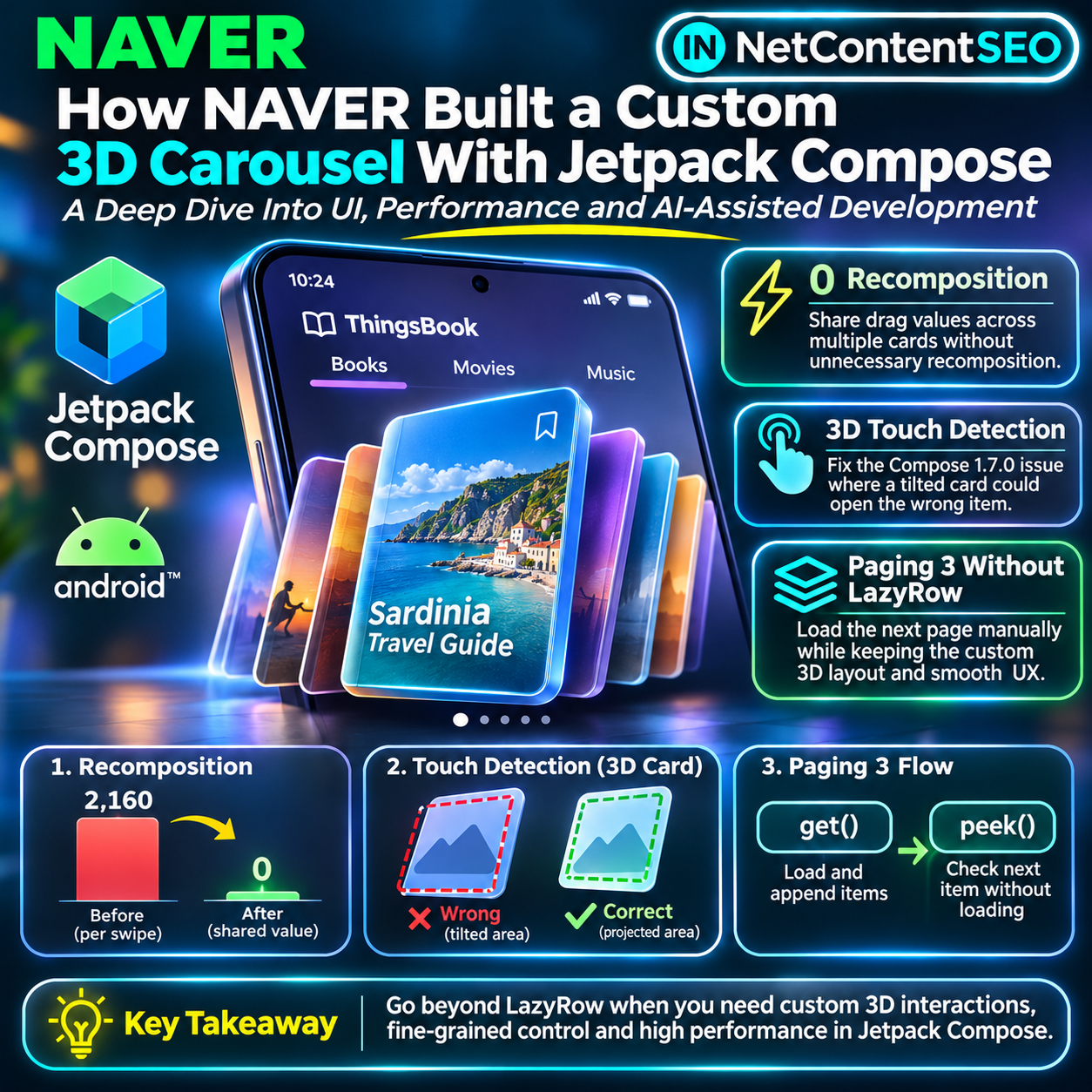

Building a visually sophisticated carousel is not simply a matter of rotating cards. NAVER's engineering case study illustrates the challenges of combining custom rendering, responsive gestures and incremental data loading in Jetpack Compose. It also offers lessons for teams using AI-assisted development: implementation must be checked against observable behavior.
Rendering without unnecessary recomposition
Frequently changing drag values can trigger unnecessary composition work when state is read in the wrong phase. Separating rapidly changing visual transformations from structural UI state can reduce that work. The supplied case-study summary reports a demonstration comparing 2,160 recompositions with zero after optimization. This is a specific demonstration, not a universal performance guarantee.
Before: 2,160
After: 0
Reported case-study counts; test conditions not independently verified.Android's Compose performance guidance explains why deferring state reads to later phases can avoid unnecessary work. Developers should also measure frame timing, layout and drawing costs rather than treating recomposition counts as a complete performance metric.
Touch detection in a transformed interface
A three-dimensional card may occupy a different projected region from its original rectangular layout. Overlapping cards also introduce questions about which item should receive a gesture. Test the edges, overlapping areas and transitions rather than assuming that a visually correct animation guarantees correct interaction.
Potential mismatch with rendered card
Validate interaction against visible content
Paging 3 outside a conventional list
A custom layout must preserve the distinction between accessing items and inspecting already presented data. In Compose Paging, indexed access can notify the paging system and trigger loads according to its prefetch configuration, whereas peek inspects an item without notifying the system of access. See the LazyPagingItems API reference.
↓
Item access and paging notification
Inspect without access notification
↓
Lessons for AI-assisted engineering
Give coding agents concrete reproduction steps, framework versions, expected interaction behavior and measurable acceptance criteria. Validate generated code with instrumentation and regression tests. A plausible implementation is not proof that gestures, rendering and pagination work together correctly.
Implications for SEO and AI Search
This is primarily a native Android engineering story, not a search ranking announcement. Its broader relevance is the need to validate AI-generated interfaces and preserve accessible content. Web teams implementing comparable carousels should retain meaningful links, accessible labels and keyboard navigation, and test performance independently. Native Compose recomposition metrics cannot be translated directly into web Core Web Vitals or ranking improvements.
Conclusion
Custom interfaces reward careful separation of rendering, interaction and data access. AI can accelerate implementation, but reproducible tests and framework-specific knowledge remain essential. The original NAVER page could not be directly verified during preparation; the reported demonstration should be checked against the original presentation before publication.